What is a BIM Execution Plan (BEP)? Complete Guide for BIM Projects
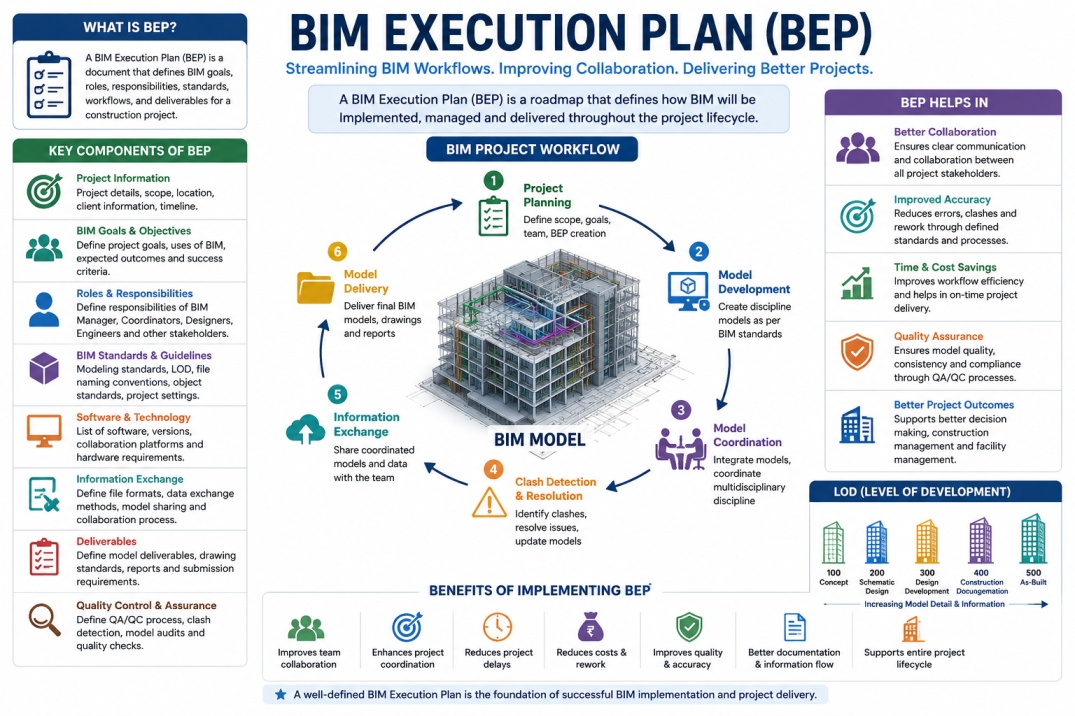
A BIM Execution Plan (BEP) is a detailed document used in Building Information Modeling (BIM) projects to define project workflows, BIM standards, team responsibilities, collaboration procedures, and information exchange processes.
The BIM Execution Plan helps architects, engineers, contractors, consultants, and project managers work together efficiently throughout the design, construction, and facility management stages of a project.
A well-structured BEP improves project coordination, reduces misunderstandings, and ensures that all project stakeholders follow the same BIM standards and workflows.
As BIM adoption continues growing worldwide, BIM Execution Plans are becoming increasingly important for construction and infrastructure projects.
What is the Purpose of a BIM Execution Plan?
The main purpose of a BIM Execution Plan is to establish clear BIM project guidelines before modeling and coordination work begins.
The BEP defines:
- BIM goals and objectives
- Project workflows and standards
- Team roles and responsibilities
- Information exchange procedures
- File naming standards
- Coordination processes
- Software platforms and versions
- Project deliverables
This helps all project participants understand how BIM workflows will be managed during the project lifecycle.
Why BIM Execution Plans Are Important
Large construction projects involve multiple disciplines including architecture, structure, plumbing, HVAC, electrical systems, and project management teams.
Without a clear BIM workflow strategy, project coordination problems and communication issues can occur frequently.
A BIM Execution Plan helps:
- Improve multidisciplinary coordination
- Reduce project conflicts
- Improve BIM collaboration
- Increase workflow efficiency
- Reduce construction errors
- Improve project communication
- Ensure BIM standard compliance
- Improve project delivery timelines
The BEP acts as a roadmap for BIM implementation throughout the project.
Types of BIM Execution Plans
There are generally two main types of BIM Execution Plans used in BIM projects.
1. Pre-Contract BIM Execution Plan
The pre-contract BEP is prepared before the project contract is finalized. It explains how the project team plans to meet the client’s BIM requirements and project goals.
This document is often used during the tendering and bidding stage of a project.
2. Post-Contract BIM Execution Plan
The post-contract BEP is developed after project approval and contract finalization.
This version includes detailed BIM workflows, coordination procedures, project schedules, modeling standards, and project responsibilities.
Main Components of a BIM Execution Plan
A professional BIM Execution Plan typically includes several important sections.
Project Information
- Project name
- Project location
- Client information
- Project scope
- Project timeline
BIM Goals and Objectives
- Project coordination goals
- Clash detection workflows
- Quantity takeoff requirements
- Construction simulation objectives
- Facility management goals
Project Team Responsibilities
- BIM manager responsibilities
- BIM coordinator roles
- Architectural team tasks
- Structural team responsibilities
- MEP coordination workflows
BIM Standards and Modeling Guidelines
- File naming conventions
- Model organization standards
- LOD requirements
- BIM object standards
- Project coordinate systems
Software and Technology Requirements
- Autodesk Revit
- Navisworks Manage
- BIM 360 or Autodesk Construction Cloud
- IFC workflows
- Cloud collaboration systems
Information Exchange Procedures
- Model sharing workflows
- File transfer procedures
- Cloud collaboration methods
- Coordination meeting schedules
- Version control standards
Clash Detection and Coordination
One of the most important parts of a BIM Execution Plan is clash detection and multidisciplinary coordination.
The BEP defines how project teams will identify, manage, and resolve clashes between architectural, structural, HVAC, plumbing, and electrical systems before construction begins.
This process helps reduce costly site issues and improves project efficiency.
BIM Levels of Development (LOD) in BEP
The BIM Execution Plan also defines the required Levels of Development (LOD) for project models at different stages of the project lifecycle.
Common LOD stages include:
- LOD 100 – Conceptual Design
- LOD 200 – Schematic Design
- LOD 300 – Design Development
- LOD 350 – Construction Documentation
- LOD 400 – Fabrication
- LOD 500 – As-Built Model
These standards help maintain model accuracy and information consistency throughout the project.
Benefits of Using a BIM Execution Plan
- Improved project coordination
- Better communication between teams
- Reduced construction conflicts
- Improved BIM workflow management
- Better project documentation
- Improved scheduling and planning
- Higher project accuracy
- Improved project delivery efficiency
A properly developed BEP helps ensure successful BIM implementation across the entire project lifecycle.
Conclusion
A BIM Execution Plan (BEP) is one of the most important documents in modern BIM workflows and digital construction projects.
It helps architects, engineers, contractors, and BIM professionals establish clear workflows, improve collaboration, reduce project conflicts, and manage BIM coordination more efficiently.
As BIM technology continues evolving globally, BIM Execution Plans are becoming essential for successful project delivery, digital collaboration, and intelligent construction management.