What is BIM LOD? Complete Guide to Level of Development in BIM
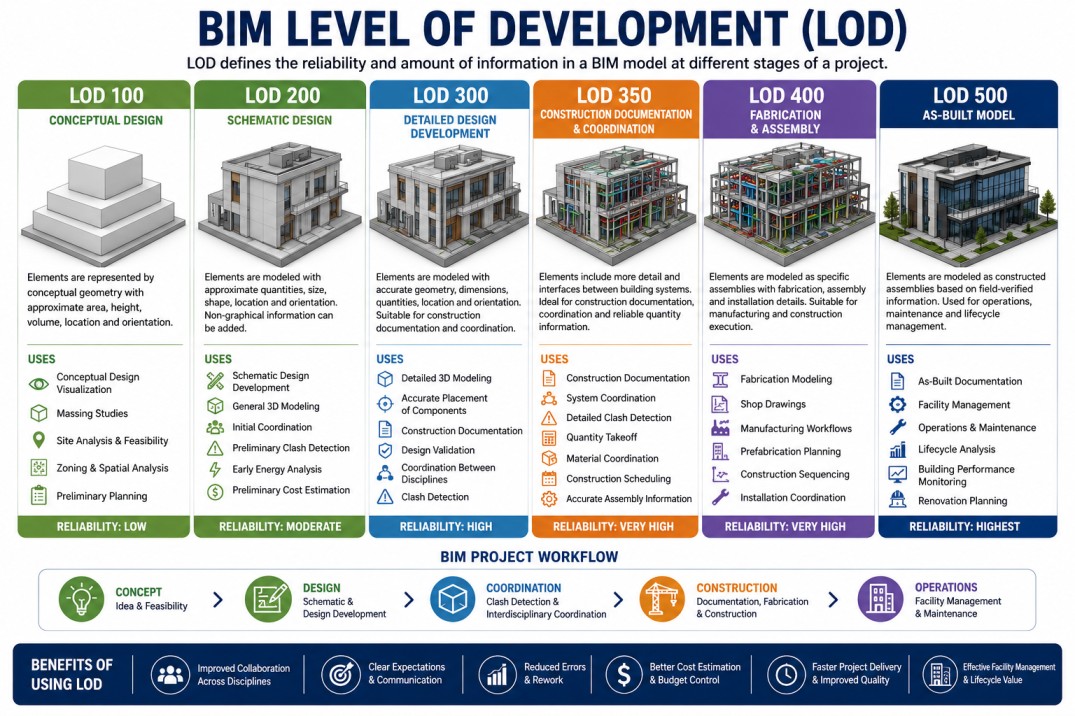
Building Information Modeling (BIM) has transformed the architecture, engineering, and construction industry by improving project visualization, coordination, and collaboration. One of the most important concepts in BIM workflows is Level of Development (LOD).
The Level of Development (LOD) functions as a BIM standard that defines the precision, reliability, and amount of information included in BIM model elements during different stages of project development.
LOD creates a standardized system that helps architects, engineers, contractors, BIM modelers, and project owners understand how detailed and accurate BIM elements are at a particular project stage.
This standardized process improves communication between project teams and reduces confusion during design, coordination, construction, fabrication, and facility management workflows.
In BIM projects, models gradually develop from conceptual geometry into highly detailed construction-ready and as-built models. LOD standards help define model completeness and reliability throughout this process.
Using proper BIM LOD workflows helps improve project planning, collaboration, clash detection, cost estimation, and construction sequencing.
Another major advantage of BIM LOD is that it clearly defines responsibilities between architects, engineers, contractors, fabricators, and project stakeholders.
The clarity provided by LOD standards helps reduce project misunderstandings and improves overall project efficiency and coordination.
Many BIM professionals confuse Level of Development with Level of Detail. Although both use the abbreviation LOD, they are different concepts.
Level of Detail mainly refers to the graphical appearance and visual complexity of model elements, while Level of Development defines the amount of reliable information available in BIM components.
For architects and contractors, information such as manufacturer details, model numbers, dimensions, quantities, assemblies, and installation data becomes increasingly important as BIM models progress through different LOD stages.
The BIM Level of Development process is commonly divided into six major levels:
LOD 100 – Conceptual Design
At LOD 100 stage, BIM models contain conceptual information and basic geometry. Elements are represented using approximate area, volume, height, location, orientation, and massing information.
LOD 100 is mainly used for:
- Conceptual design visualization
- Site analysis and feasibility studies
- Massing studies
- Preliminary project planning
- Zoning and spatial analysis
At this stage, BIM models are mainly used for visualization and early decision-making rather than detailed construction workflows.
LOD 200 – Schematic Design
At LOD 200 level, BIM elements contain approximate quantities, shape, size, location, and orientation. Basic systems and spatial coordination begin to appear within the BIM model.
LOD 200 is commonly used for:
- Schematic design development
- General 3D modeling
- Initial coordination workflows
- Preliminary clash detection
- Early energy analysis
- Initial cost estimation
Non-graphical information can also be embedded into BIM components during the LOD 200 stage.
LOD 300 – Detailed Design Development
LOD 300 models contain accurate geometry, dimensions, quantities, locations, and orientations. Building components are modeled precisely enough for detailed coordination and construction documentation.
At this stage, BIM elements include accurate information that project teams can rely on for design coordination and documentation workflows.
LOD 300 is commonly used for:
- Detailed 3D BIM modeling
- Accurate placement of components
- BIM coordination between disciplines
- Construction documentation
- Design validation
- Clash detection workflows
Architectural, structural, and MEP teams collaborate extensively during the LOD 300 phase.
LOD 350 – Construction Documentation & Coordination
LOD 350 introduces additional details that show how building systems interact and connect with one another. This stage focuses heavily on interdisciplinary coordination and construction documentation.
LOD 350 models include interfaces between architectural, structural, plumbing, HVAC, and electrical systems.
LOD 350 is commonly used for:
- Construction documentation
- System coordination
- Detailed clash detection
- Quantity takeoff
- Material coordination
- Construction scheduling
- Accurate assembly information
At this stage, BIM models become highly coordinated and provide clearer information for contractors and project teams.
LOD 400 – Fabrication & Assembly
LOD 400 represents fabrication-level BIM modeling. Components include detailed fabrication, assembly, installation, and manufacturing information.
Contractors and fabricators use LOD 400 models for offsite fabrication, shop drawings, and detailed construction workflows.
LOD 400 is commonly used for:
- Fabrication modeling
- Shop drawings
- Manufacturing workflows
- Prefabrication planning
- Construction sequencing
- Installation coordination
At this level, BIM elements contain precise quantities, geometry, assemblies, and fabrication information.
LOD 500 – As-Built Models
LOD 500 represents the final as-built BIM model after construction completion. Elements are modeled according to actual field conditions and verified construction information.
LOD 500 models are used for operations, facility management, maintenance, renovations, and lifecycle analysis.
LOD 500 is commonly used for:
- As-built BIM documentation
- Facility management
- Operations and maintenance
- Building performance monitoring
- Lifecycle management
- Future renovation planning
Modern BIM workflows continue to evolve with technologies such as cloud collaboration, artificial intelligence (AI), digital twins, augmented reality (AR), and virtual reality (VR).
Today, BIM LOD standards are becoming increasingly important for architects, engineers, contractors, BIM coordinators, and construction professionals worldwide.
Understanding BIM LOD helps improve project quality, reduce construction errors, increase collaboration, and deliver more efficient building projects.