Top 10 Mistakes BIM Beginners Make (And How to Avoid Them)
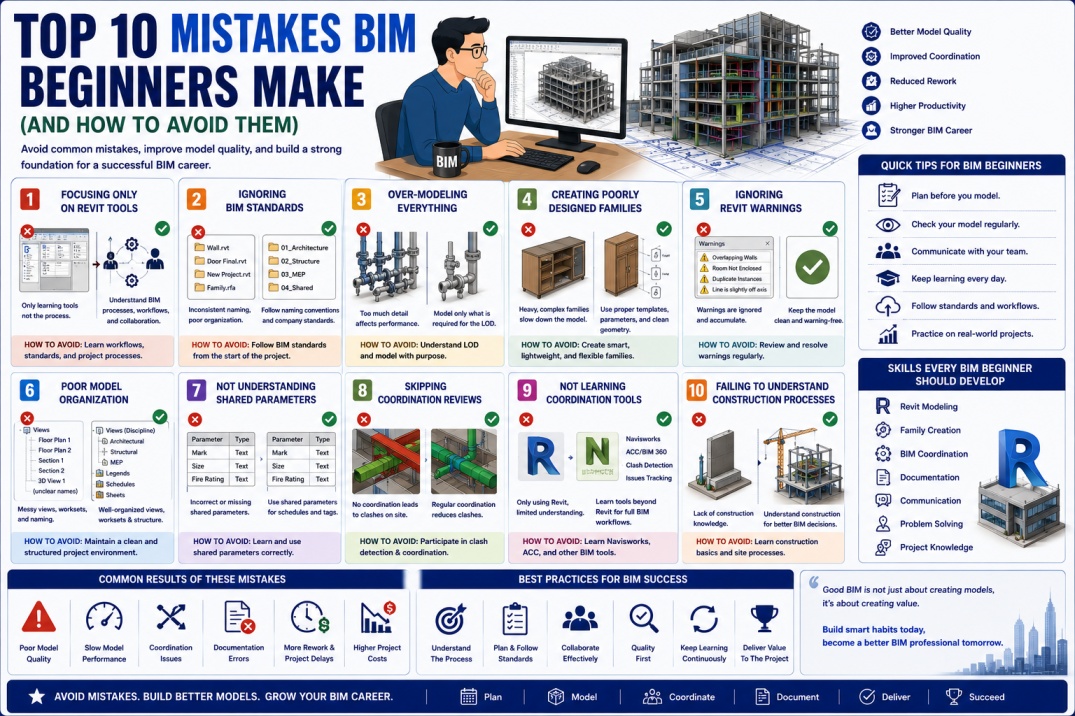
Building Information Modeling (BIM) has become one of the most valuable skills in the Architecture, Engineering, and Construction (AEC) industry. As more organizations adopt BIM workflows, thousands of students, engineers, architects, and designers are beginning their BIM journey every year.
Learning BIM software such as Autodesk Revit is only one part of becoming a successful BIM professional. Understanding industry workflows, modeling standards, coordination processes, and information management is equally important.
Many beginners focus only on creating models and drawings while overlooking the principles that make BIM projects successful. These mistakes can lead to poor model quality, project coordination problems, performance issues, and reduced productivity.
The good news is that most beginner mistakes are easy to avoid once you understand them. Let's explore the top 10 mistakes BIM beginners make and how you can avoid them.
Why Learning BIM Correctly Matters
BIM is much more than 3D modeling. It is a collaborative process that helps project teams design, coordinate, construct, and manage buildings more efficiently.
Developing good BIM habits early can help:
- Improve project quality.
- Increase productivity.
- Reduce modeling errors.
- Support better coordination.
- Improve career opportunities.
- Build professional confidence.
Avoiding common mistakes will accelerate your growth as a BIM professional.
1. Focusing Only on Revit Tools
One of the biggest mistakes beginners make is believing BIM is only about learning software commands.
While Revit skills are important, BIM also includes:
- Information management.
- Project coordination.
- Collaboration workflows.
- BIM standards.
- Construction processes.
- Data management.
Successful BIM professionals understand both software and project workflows.
How to Avoid It
Learn BIM processes alongside software skills. Study coordination workflows, BIM standards, and construction practices.
2. Ignoring BIM Standards
Many beginners start modeling without understanding company or project standards.
This often leads to inconsistent models and documentation.
Common Issues
- Incorrect naming conventions.
- Poor model organization.
- Inconsistent parameters.
- Documentation problems.
How to Avoid It
Always review BIM standards before starting a project and follow established guidelines consistently.
3. Over-Modeling Everything
Beginners often try to model every small detail they see.
Although detailed models may look impressive, excessive detail often creates performance problems and unnecessary work.
Examples
- Modeling screws and bolts unnecessarily.
- Creating highly detailed furniture.
- Adding excessive geometry to families.
How to Avoid It
Model only what is required for the project's Level of Development (LOD).
4. Creating Poorly Designed Families
Family creation is a critical BIM skill, but beginners frequently create families without considering performance and flexibility.
Poor family design can:
- Increase file size.
- Reduce model performance.
- Create scheduling issues.
- Complicate project maintenance.
How to Avoid It
Use proper templates, create clean parameters, simplify geometry, and test families before deployment.
5. Ignoring Revit Warnings
Many beginners assume Revit warnings are unimportant.
Over time, unresolved warnings can accumulate and negatively affect model quality and performance.
Examples
- Duplicate instances.
- Overlapping walls.
- Room separation issues.
- Constraint conflicts.
How to Avoid It
Review warnings regularly and resolve critical issues as soon as possible.
6. Poor Model Organization
Disorganized projects make collaboration difficult and increase the likelihood of mistakes.
Common organization issues include:
- Unstructured views.
- Random worksets.
- Poor naming conventions.
- Unused content.
How to Avoid It
Maintain a clean project structure and follow consistent naming standards.
7. Not Understanding Shared Parameters
Shared Parameters are essential for schedules, tags, and BIM data management.
Many beginners use project parameters incorrectly or fail to understand how shared parameters work.
Consequences
- Broken tags.
- Incomplete schedules.
- Data inconsistency.
- Poor interoperability.
How to Avoid It
Learn the difference between Shared Parameters and Project Parameters early in your BIM career.
8. Skipping Coordination Reviews
Some beginners focus only on their discipline without reviewing how their work affects other systems.
This often leads to coordination issues later in the project.
Examples
- Ducts conflicting with beams.
- Pipes crossing electrical systems.
- Equipment blocking access zones.
How to Avoid It
Participate in coordination reviews and understand multidisciplinary workflows.
9. Not Learning Navisworks and Coordination Tools
Many BIM beginners spend all their time learning Revit while ignoring coordination software.
However, BIM careers often require knowledge of:
- Navisworks.
- Autodesk Construction Cloud.
- BIM Collaborate.
- Clash Detection tools.
How to Avoid It
Expand your skills beyond modeling and learn coordination workflows used in real projects.
10. Failing to Understand Construction Processes
BIM exists to support real-world construction projects.
Beginners who lack construction knowledge often struggle to understand why models are created in certain ways.
Important Areas to Learn
- Building systems.
- Construction sequencing.
- Site workflows.
- Fabrication requirements.
- Project delivery methods.
How to Avoid It
Study construction practices alongside BIM software skills.
Additional Mistakes Beginners Often Make
Beyond the top ten mistakes, BIM beginners frequently encounter several other challenges.
- Using imported CAD excessively.
- Ignoring file performance.
- Not backing up projects.
- Creating duplicate content.
- Avoiding documentation standards.
- Not asking questions.
Awareness of these issues helps build stronger BIM habits.
How to Accelerate Your BIM Learning
The fastest way to improve is through a combination of training, practice, and real-world project exposure.
Recommended Learning Areas
- Revit Modeling.
- Family Creation.
- BIM Coordination.
- Navisworks.
- ISO 19650.
- Autodesk Construction Cloud.
- BIM Standards.
- Construction Technology.
Developing knowledge across these areas creates a strong foundation for long-term success.
Skills Employers Look For
Modern BIM employers value more than technical software skills.
Important qualities include:
- Attention to detail.
- Problem-solving ability.
- Communication skills.
- Coordination experience.
- Teamwork.
- Continuous learning mindset.
Avoiding beginner mistakes helps demonstrate these qualities in professional environments.
Future Growth in BIM Careers
The BIM industry continues evolving through technologies such as Artificial Intelligence, Digital Twins, cloud collaboration, automation, and Smart Cities.
Professionals who establish strong BIM fundamentals early will be better prepared to adapt to future industry developments.
Learning correct workflows today creates opportunities for future roles such as BIM Coordinator, BIM Manager, Digital Twin Specialist, and Construction Technology Consultant.
Conclusion
Every BIM professional makes mistakes while learning, but understanding common beginner challenges can significantly accelerate your development.
By avoiding issues such as over-modeling, ignoring standards, neglecting coordination, creating poor families, and focusing only on software tools, you can build stronger BIM skills and improve project quality.
Remember that BIM is not simply about creating models—it is about managing information, supporting collaboration, and contributing to successful project delivery. Developing good habits early will help you become a more effective and valuable BIM professional throughout your career.