Point Cloud to Revit Workflow Explained
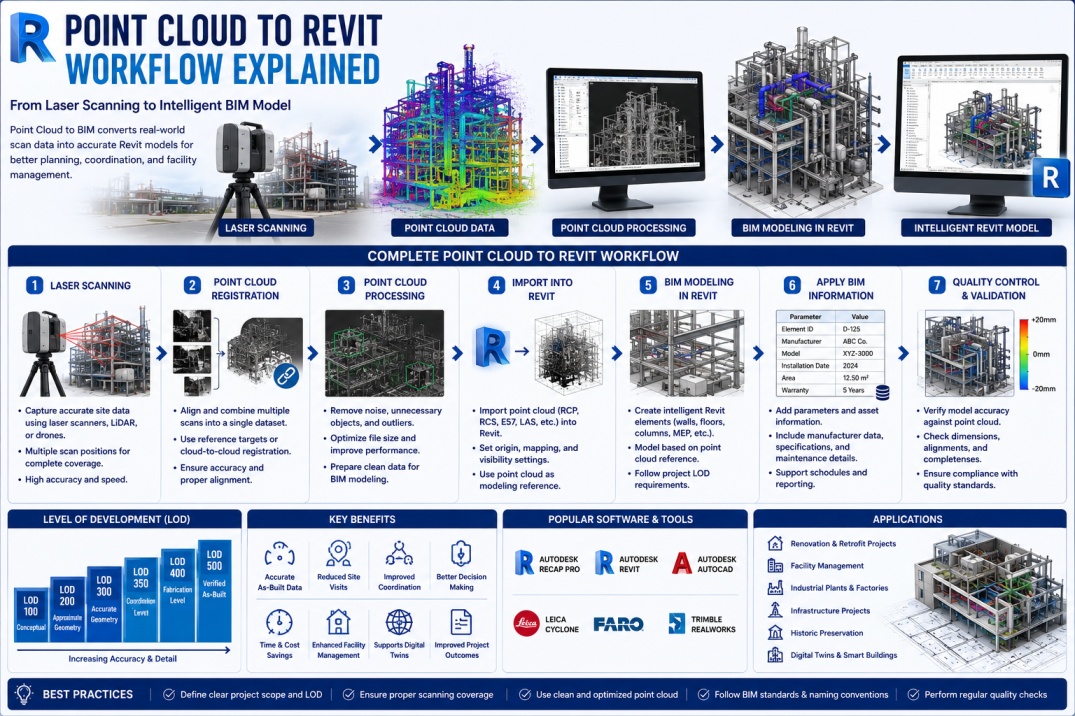
As-built documentation has always been one of the biggest challenges in the Architecture, Engineering, and Construction (AEC) industry. Many existing buildings lack accurate drawings, while older documentation may no longer reflect current site conditions.
Traditional surveying methods often require significant time, manual measurements, and repeated site visits. These limitations can increase project costs and introduce inaccuracies into renovation, retrofit, and facility management projects.
To overcome these challenges, organizations increasingly rely on laser scanning and Point Cloud to BIM workflows. By capturing millions of accurate measurements from existing structures and converting them into intelligent Revit models, project teams can create highly reliable digital representations of real-world assets.
Today, Point Cloud to Revit workflows are widely used in renovation projects, facility management, heritage preservation, industrial facilities, infrastructure projects, and Digital Twin development.
What is a Point Cloud?
A point cloud is a collection of millions or even billions of individual data points captured using laser scanners, LiDAR devices, drones, or photogrammetry technologies.
Each point contains spatial information that represents the exact location of a physical surface in three-dimensional space.
Together, these points create a highly detailed digital representation of an existing building, structure, or environment.
Point clouds capture:
- Building geometry.
- Structural elements.
- MEP systems.
- Site conditions.
- Architectural details.
- Infrastructure assets.
This data serves as the foundation for Scan-to-BIM workflows.
What is Point Cloud to BIM?
Point Cloud to BIM is the process of converting laser-scanned point cloud data into an intelligent Building Information Model.
Instead of simply viewing scanned information, BIM professionals create Revit elements such as walls, floors, columns, beams, pipes, ducts, and equipment based on the scanned geometry.
The result is an accurate BIM model that can be used for design, coordination, analysis, construction planning, facility management, and Digital Twin applications.
Why Point Cloud to Revit is Important
Accurate existing-condition information is critical for many projects.
Traditional documentation often contains inaccuracies that lead to coordination problems and construction conflicts.
Point Cloud to Revit workflows provide:
- Accurate as-built information.
- Reduced site visits.
- Improved renovation planning.
- Better clash detection.
- Enhanced facility management.
- Support for Digital Twins.
- Improved project coordination.
These benefits help project teams make better decisions throughout the project lifecycle.
Step 1: Laser Scanning the Existing Building
The Point Cloud to BIM process begins with reality capture.
Specialized laser scanners are used to collect highly accurate measurements from the existing environment.
Common Scanning Technologies
- Terrestrial Laser Scanners.
- Mobile LiDAR Systems.
- Drone-Based Scanning.
- Photogrammetry.
Modern scanners can capture millions of points per second, producing extremely detailed digital datasets.
Benefits of Laser Scanning
- High accuracy.
- Fast data collection.
- Reduced manual measurements.
- Comprehensive site documentation.
Step 2: Point Cloud Registration
Large buildings typically require multiple scan positions to capture all areas of the site.
These individual scans must be combined into a single coordinated dataset through a process known as registration.
Registration aligns scans using common reference points and creates a unified point cloud model.
Popular Registration Software
- Autodesk ReCap Pro.
- Leica Cyclone.
- FARO Scene.
- Trimble RealWorks.
Accurate registration is essential for successful BIM modeling.
Step 3: Point Cloud Processing
Raw scan data often contains unwanted information and noise.
Before importing into Revit, point clouds typically undergo processing and cleanup.
Processing Activities
- Removing duplicate points.
- Filtering noise.
- Deleting irrelevant objects.
- Optimizing file size.
- Improving scan alignment.
Proper processing improves model quality and performance.
Step 4: Importing Point Clouds into Revit
Once processed, point cloud files can be imported into Autodesk Revit.
Common file formats include:
- RCP.
- RCS.
- E57.
- LAS.
Autodesk ReCap is often used to prepare point cloud data for Revit workflows.
Inside Revit, the point cloud serves as a reference for creating BIM elements.
Step 5: Creating the BIM Model
This stage is the core of the Point Cloud to Revit workflow.
BIM modelers analyze point cloud data and create intelligent Revit elements that accurately represent existing conditions.
Elements Commonly Modeled
- Walls.
- Floors.
- Roofs.
- Columns.
- Beams.
- Doors.
- Windows.
- Ductwork.
- Piping systems.
- Electrical components.
Unlike the point cloud itself, Revit elements contain BIM intelligence that supports project workflows.
Step 6: Applying BIM Information
After geometry creation, project information is added to the model.
This may include:
- Asset data.
- Manufacturer information.
- Equipment specifications.
- Maintenance information.
- Classification codes.
- Facility management data.
This information transforms the model into a valuable BIM asset.
Step 7: Quality Control and Validation
Quality control is one of the most important stages of any Scan-to-BIM project.
The BIM model must be verified against the original point cloud to ensure accuracy.
Quality Checks Include
- Geometry validation.
- Alignment verification.
- Dimension checks.
- Model completeness review.
- LOD compliance verification.
Quality control ensures the final deliverable meets project requirements.
Understanding Level of Development (LOD)
Point Cloud to BIM projects typically follow specific Levels of Development (LOD).
Common LOD Requirements
- LOD 100 – Conceptual Representation.
- LOD 200 – Approximate Geometry.
- LOD 300 – Accurate Geometry.
- LOD 350 – Coordination Level.
- LOD 400 – Fabrication Level.
- LOD 500 – Verified As-Built Model.
The required LOD depends on project objectives and deliverables.
Applications of Point Cloud to Revit
Point Cloud to BIM workflows support numerous project types.
Renovation Projects
Accurate existing conditions help designers plan renovations more effectively.
Facility Management
Owners use BIM models for maintenance and asset management.
Historic Preservation
Heritage structures can be digitally documented and preserved.
Industrial Facilities
Complex industrial environments benefit from accurate digital documentation.
Digital Twins
Point Cloud to BIM serves as a foundation for Digital Twin development.
Challenges in Point Cloud to BIM Projects
Although highly beneficial, Scan-to-BIM projects present several challenges.
- Large data volumes.
- Complex geometry.
- Occluded areas.
- Scan noise.
- Registration errors.
- High modeling effort.
Experienced BIM teams use structured workflows to manage these challenges effectively.
Best Practices for Point Cloud to Revit Projects
- Define project scope clearly.
- Establish required LOD before modeling.
- Use standardized BIM templates.
- Perform regular quality checks.
- Optimize point cloud data.
- Maintain consistent naming conventions.
- Coordinate closely with stakeholders.
Following these practices improves project efficiency and deliverable quality.
Future of Point Cloud to BIM
Advancements in Artificial Intelligence, machine learning, and automation are rapidly transforming Scan-to-BIM workflows.
Emerging technologies can automatically recognize walls, floors, pipes, and equipment directly from point cloud data.
Future workflows may significantly reduce manual modeling effort while improving accuracy and consistency.
These innovations will further support Digital Twins, Smart Buildings, and intelligent asset management systems.
Conclusion
Point Cloud to Revit workflows have revolutionized how existing buildings and infrastructure are documented and modeled. By combining laser scanning technology with BIM processes, project teams can create highly accurate digital representations that support design, construction, facility management, and Digital Twin applications.
As Scan-to-BIM technologies continue evolving, Point Cloud to Revit will remain one of the most valuable workflows for capturing real-world conditions and transforming them into intelligent BIM assets.
For BIM professionals looking to expand their expertise, understanding Point Cloud to Revit processes is becoming an increasingly valuable skill in the digital construction industry.