Revit Family Library Management Best Practices for BIM Teams
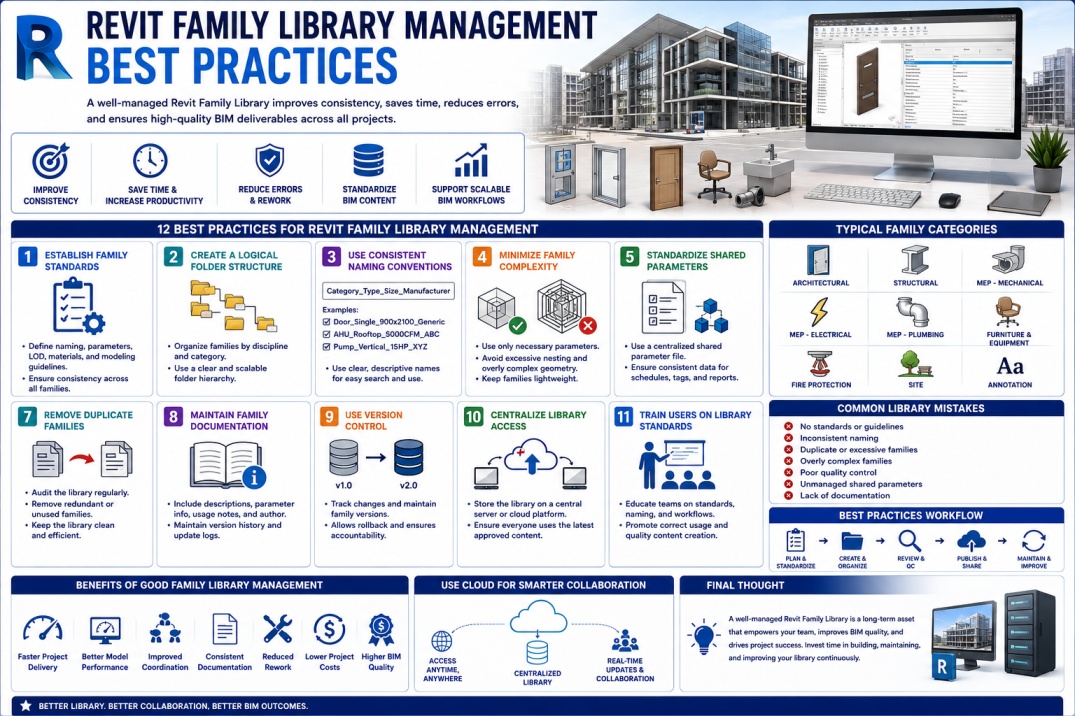
Revit families are the foundation of every Building Information Modeling (BIM) project. From doors and windows to mechanical equipment and structural components, families contain the information that drives project documentation, coordination, scheduling, and construction workflows.
As organizations grow and complete more projects, their family libraries often expand into thousands of BIM objects. Without proper management, these libraries can become disorganized, difficult to maintain, and inefficient for project teams.
A structured Revit Family Library Management strategy helps BIM teams maintain consistency, improve productivity, reduce errors, and support high-quality project delivery.
Whether you are a BIM Manager, BIM Coordinator, BIM Modeler, Architect, or Engineer, understanding family library management best practices is essential for long-term BIM success.
What is a Revit Family Library?
A Revit Family Library is a centralized collection of Revit families used across multiple projects within an organization.
These families may include:
- Architectural components.
- Structural elements.
- Mechanical equipment.
- Electrical devices.
- Plumbing fixtures.
- Furniture.
- Specialty equipment.
- Annotation families.
A well-managed library ensures that project teams use approved and standardized content instead of creating duplicate families for every project.
Why Family Library Management Matters
Many BIM teams focus on creating families but overlook the importance of managing them effectively.
Poor family management can cause:
- Duplicate content.
- Inconsistent standards.
- Large project file sizes.
- Model performance issues.
- Incorrect schedules.
- Documentation errors.
- Reduced team productivity.
Proper management ensures that families remain reliable, accurate, and efficient throughout their lifecycle.
1. Establish Family Creation Standards
Before building a family library, organizations should create clear family standards.
These standards help ensure consistency regardless of who creates the family.
Standards Should Define
- Naming conventions.
- Parameter requirements.
- Geometry guidelines.
- LOD requirements.
- Material standards.
- Visibility settings.
- Documentation procedures.
Standardized families improve project quality and reduce confusion across teams.
2. Create a Logical Folder Structure
One of the most common library management mistakes is storing families without a clear organizational structure.
A logical folder hierarchy helps users find content quickly.
Example Structure
- Architecture
- Doors
- Windows
- Furniture
- Casework
- Structure
- Columns
- Beams
- Foundations
- MEP
- Mechanical
- Electrical
- Plumbing
- Fire Protection
A structured library improves accessibility and reduces search time.
3. Use Consistent Naming Conventions
Consistent naming conventions are essential for managing large BIM libraries.
Family names should provide clear information about the content.
Example Naming Format
Category_Type_Size_Manufacturer
Examples:
- Door_Single_900x2100_Generic
- AHU_Rooftop_5000CFM_ABC
- Pump_Vertical_15HP_XYZ
Consistent naming improves searchability and reduces duplication.
4. Minimize Family Complexity
Many family creators attempt to build highly complex families with excessive parameters and detailed geometry.
While flexibility is important, overly complicated families can negatively affect model performance.
Best Practices
- Use only necessary parameters.
- Avoid excessive nesting.
- Simplify geometry.
- Remove unnecessary detail.
- Optimize file size.
Efficient families contribute to healthier project models.
5. Standardize Shared Parameters
Shared Parameters play a critical role in BIM data management.
Organizations should maintain a centralized Shared Parameter file used across all projects and families.
Benefits
- Consistent schedules.
- Reliable tagging.
- Improved data exchange.
- Better reporting.
- Enhanced interoperability.
A well-maintained Shared Parameter strategy improves BIM data consistency.
6. Implement Quality Control Procedures
Every family should undergo quality control before being added to the library.
Quality reviews help identify modeling errors and compliance issues.
Review Checklist
- Correct category assignment.
- Proper parameter setup.
- Accurate geometry.
- Material validation.
- Visibility testing.
- Schedule verification.
Quality control prevents problematic families from reaching project teams.
7. Remove Duplicate Families
Over time, libraries often accumulate multiple versions of similar families.
Duplicate content creates confusion and increases maintenance requirements.
Organizations should regularly audit their libraries and remove redundant families.
Benefits
- Cleaner library structure.
- Reduced storage requirements.
- Improved content consistency.
- Easier maintenance.
8. Maintain Family Documentation
Proper documentation helps users understand how families should be used.
Family documentation may include:
- Family descriptions.
- Parameter explanations.
- Version history.
- Usage instructions.
- Author information.
Documentation reduces support requests and improves adoption.
9. Use Version Control
Family libraries evolve over time as standards and project requirements change.
Version control helps track updates and maintain consistency.
Version Control Benefits
- Change tracking.
- Rollback capability.
- Improved accountability.
- Better quality management.
Version management becomes increasingly important as library size grows.
10. Centralize Library Access
Family libraries should be accessible from a central location.
Many organizations use:
- Network servers.
- Autodesk Construction Cloud.
- SharePoint.
- BIM content management systems.
Centralized access ensures that everyone uses the latest approved content.
11. Train Users on Library Standards
Even the best library structure can fail if users do not understand how to use it properly.
Regular training should cover:
- Family standards.
- Naming conventions.
- Content requests.
- Quality requirements.
- Library workflows.
Training improves consistency and user adoption.
12. Perform Regular Library Audits
Family libraries should be reviewed periodically to maintain quality and relevance.
Audits help identify:
- Duplicate content.
- Outdated families.
- Performance issues.
- Missing standards.
- Unused content.
Regular audits keep libraries organized and efficient.
Common Family Library Mistakes
Organizations often encounter the following challenges:
- No family standards.
- Inconsistent naming.
- Duplicate families.
- Overly detailed content.
- Poor quality control.
- Unmanaged shared parameters.
- Lack of documentation.
Avoiding these mistakes significantly improves BIM efficiency.
Benefits of a Well-Managed Family Library
Organizations that invest in family library management often experience:
- Faster project delivery.
- Improved BIM quality.
- Reduced modeling time.
- Better coordination.
- Lower maintenance effort.
- Improved consistency.
- Enhanced user productivity.
These benefits directly support successful BIM implementation.
Future of Revit Family Management
The future of BIM content management is moving toward cloud-based libraries, AI-assisted content creation, Digital Twins, and centralized asset management platforms.
Organizations that establish strong family management processes today will be better prepared for future BIM workflows and technology advancements.
Conclusion
Revit Family Library Management is much more than storing BIM content in folders. It involves creating standards, organizing information, maintaining quality, managing updates, and ensuring that project teams have access to reliable content.
By implementing best practices such as consistent naming conventions, shared parameter management, quality control procedures, and regular audits, organizations can build efficient family libraries that support long-term BIM success.
A well-managed family library not only improves project productivity but also creates a strong foundation for scalable and sustainable BIM operations.