How to Optimize Large Revit Models for Better Performance
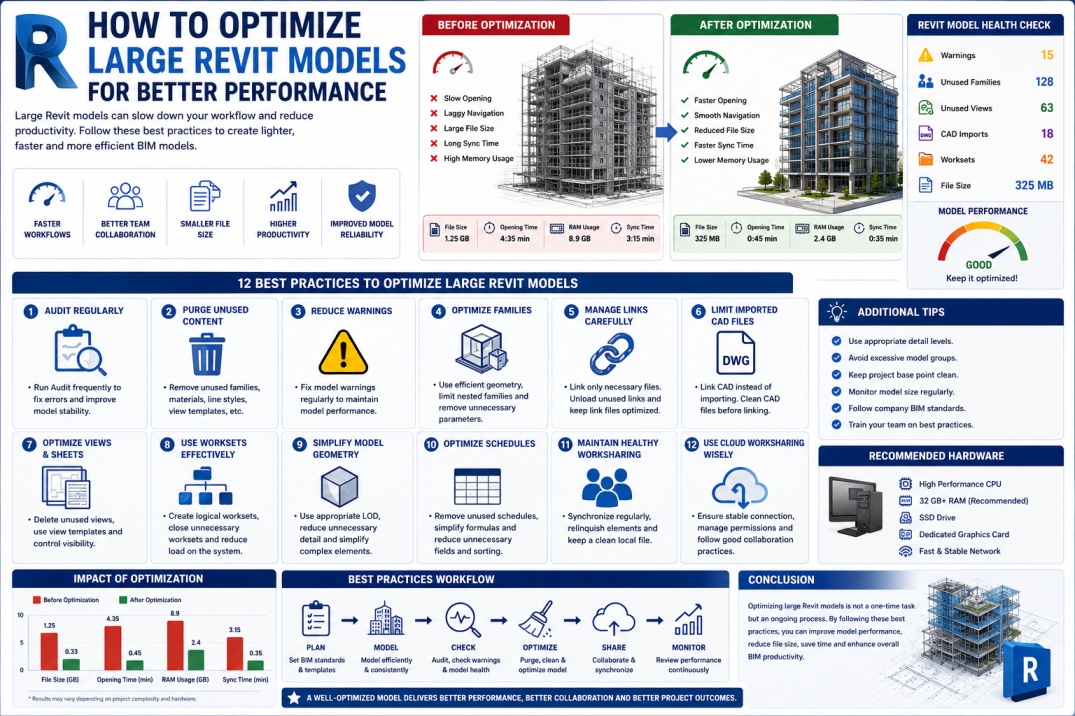
Autodesk Revit is one of the most powerful BIM platforms used throughout the Architecture, Engineering, and Construction (AEC) industry. As projects increase in size and complexity, BIM teams often encounter performance challenges that affect productivity and project efficiency.
Large Revit models can become slow to open, difficult to navigate, and time-consuming to synchronize. These issues not only frustrate project teams but can also impact project schedules, collaboration workflows, and overall BIM quality.
Fortunately, many performance problems can be prevented through proper model management and optimization techniques. Understanding how to maintain healthy Revit models is an essential skill for BIM Modelers, BIM Coordinators, and BIM Managers.
Why Revit Models Become Slow
Before discussing optimization strategies, it is important to understand why Revit models lose performance over time.
As projects develop, models accumulate increasing amounts of geometry, views, families, links, annotations, and project information. If these elements are not managed properly, model size and complexity can grow significantly.
Common causes of poor performance include:
- Excessive file size.
- Too many loaded families.
- Unnecessary imported CAD files.
- Large numbers of views.
- Complex geometry.
- Excessive warnings.
- Poor worksharing practices.
- Overloaded schedules.
Identifying these issues early helps maintain project performance throughout the design and construction process.
Why Revit Performance Matters
Model performance directly affects productivity. Even small delays can accumulate into significant time losses across large project teams.
Benefits of an optimized Revit model include:
- Faster model opening times.
- Improved navigation.
- Faster synchronization.
- Better team collaboration.
- Reduced project downtime.
- Improved user experience.
- More efficient BIM workflows.
Organizations that actively manage model performance often experience substantial productivity gains.
1. Regularly Audit Revit Models
One of the simplest ways to maintain model health is by performing regular audits.
The Audit function checks the model database for inconsistencies and repairs certain types of corruption.
Benefits include:
- Improved file stability.
- Reduced corruption risks.
- Better overall performance.
- Cleaner project data.
Many BIM managers schedule audits periodically throughout the project lifecycle.
2. Purge Unused Content
Over time, Revit projects accumulate unused families, materials, line styles, view templates, and other project components.
These elements increase file size without providing value.
Using the Purge Unused command helps remove unnecessary content and improve performance.
Items commonly removed include:
- Unused families.
- Unused materials.
- Unused view templates.
- Unused line styles.
- Unused object styles.
Regular purging helps keep project files manageable.
3. Reduce Revit Warnings
Large numbers of unresolved warnings can negatively affect model performance.
Warnings often indicate issues such as duplicate elements, overlapping walls, room problems, and constraint conflicts.
Best practice is to review warnings regularly and resolve critical issues before they accumulate.
A healthy BIM model generally contains significantly fewer warnings than unmanaged projects.
4. Optimize Revit Families
Families are one of the most common sources of performance issues.
Poorly created families may contain excessive detail, unnecessary geometry, and overly complex parameters.
To improve performance:
- Use simplified geometry where possible.
- Avoid excessive nested families.
- Remove unnecessary parameters.
- Use detail levels appropriately.
- Maintain consistent family standards.
Well-optimized families contribute significantly to overall model efficiency.
5. Manage Linked Models Carefully
Linked models are essential for BIM coordination, but excessive links can impact performance.
Best practices include:
- Link only necessary models.
- Unload unused links.
- Use shared coordinates properly.
- Remove outdated references.
- Monitor link file sizes.
Efficient link management improves model responsiveness and navigation.
6. Limit Imported CAD Files
CAD imports are one of the most common causes of poor Revit performance.
Imported files often contain unnecessary layers, linework, blocks, and geometry that increase project complexity.
Whenever possible:
- Link CAD files instead of importing them.
- Clean CAD files before linking.
- Remove unnecessary layers.
- Delete unused geometry.
Reducing CAD dependency helps maintain healthier BIM models.
7. Optimize Views and Sheets
Projects with hundreds of views can experience noticeable performance issues.
Each view requires Revit to process visibility settings, annotations, and model information.
Optimization strategies include:
- Delete unused views.
- Remove duplicate views.
- Use view templates.
- Limit unnecessary detail levels.
- Control visibility settings.
Well-managed views improve project efficiency and reduce file size.
8. Use Worksets Effectively
Worksets play an important role in large collaborative projects.
Proper workset management allows users to load only the information they need.
Best practices include:
- Create logical workset structures.
- Avoid excessive worksets.
- Close unnecessary worksets.
- Monitor worksharing performance.
Efficient workset usage improves loading times and reduces resource consumption.
9. Simplify Model Geometry
Highly detailed geometry can significantly impact model performance.
Many elements contain more detail than necessary for the project's current stage.
Consider:
- Using appropriate Levels of Development (LOD).
- Simplifying repetitive components.
- Reducing unnecessary detail.
- Using symbolic representations where appropriate.
Simplified models are easier to manage and perform better.
10. Optimize Schedules
Large schedules can slow project performance, especially when they contain extensive calculations and filtering rules.
To improve efficiency:
- Remove unused schedules.
- Simplify formulas.
- Limit unnecessary fields.
- Reduce excessive sorting and filtering.
Efficient schedules contribute to faster project operation.
11. Maintain Healthy Worksharing Practices
Worksharing performance directly impacts team productivity.
Recommended practices include:
- Synchronize regularly.
- Relinquish unused worksets.
- Avoid excessive ownership conflicts.
- Keep local files updated.
- Create new local files periodically.
Good worksharing habits improve collaboration and reduce project issues.
12. Use Revit Cloud Worksharing Wisely
Cloud-based collaboration platforms such as Autodesk Construction Cloud provide significant benefits, but proper management remains important.
Ensure:
- Stable internet connections.
- Appropriate project permissions.
- Regular model maintenance.
- Controlled file management.
Cloud collaboration can greatly improve team efficiency when implemented correctly.
Hardware Considerations
Even a well-optimized model can perform poorly on inadequate hardware.
For large BIM projects, organizations should consider:
- High-performance processors.
- Sufficient RAM.
- Solid State Drives (SSD).
- Dedicated graphics cards.
- Reliable network infrastructure.
Proper hardware investments support efficient BIM workflows.
Role of BIM Managers in Performance Optimization
BIM Managers play a critical role in maintaining project performance.
Responsibilities often include:
- Monitoring model health.
- Establishing BIM standards.
- Conducting model audits.
- Managing worksharing practices.
- Supporting team training.
Strong BIM management helps prevent performance problems before they affect project delivery.
Future of Revit Performance Optimization
Autodesk continues improving Revit performance through software enhancements, cloud technologies, and automation tools.
Emerging technologies such as Artificial Intelligence and advanced analytics may further assist BIM teams by automatically identifying performance bottlenecks and recommending optimization strategies.
As BIM projects continue growing in complexity, performance management will remain a critical aspect of successful project delivery.
Conclusion
Large Revit models can become challenging to manage without proper optimization strategies. By regularly auditing projects, reducing warnings, optimizing families, managing links, simplifying geometry, and following good worksharing practices, BIM teams can significantly improve model performance.
Optimized Revit models support faster workflows, better collaboration, and more efficient project delivery. Whether you are a BIM Modeler, BIM Coordinator, or BIM Manager, developing strong model management skills is essential for maintaining high-performing BIM projects.
As digital construction continues evolving, organizations that prioritize model optimization will be better positioned to deliver successful projects efficiently and competitively.