Open BIM vs Closed BIM: Which Workflow is Better?
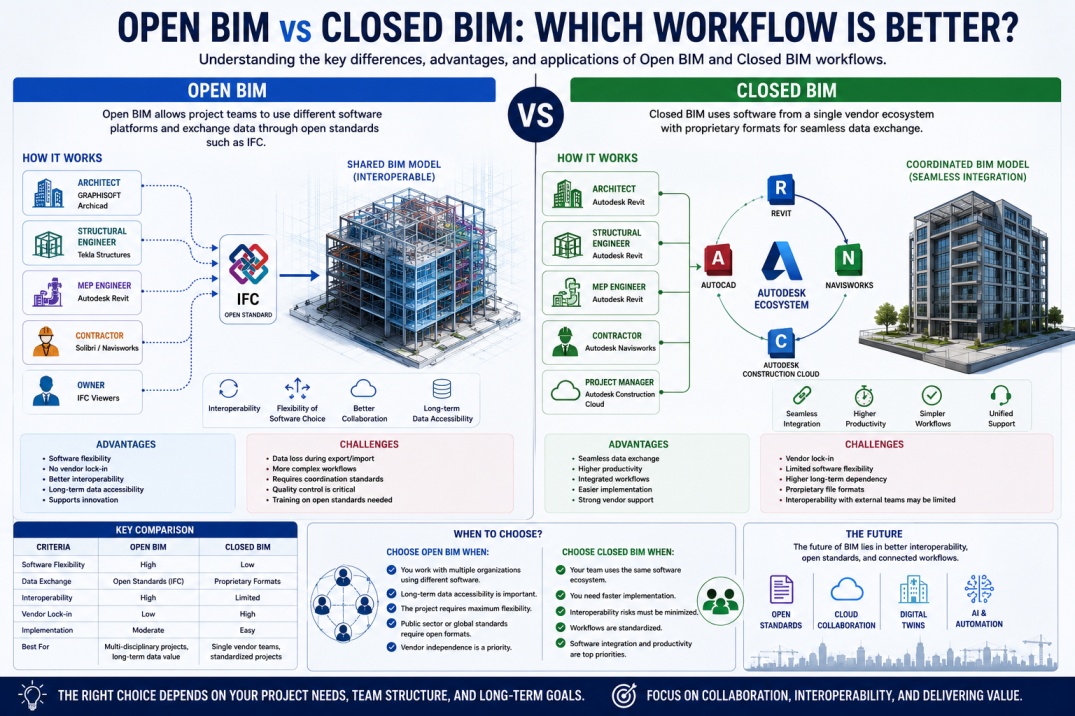
Building Information Modeling (BIM) has transformed how construction projects are designed, coordinated, and delivered. Modern BIM workflows allow architects, engineers, contractors, and owners to collaborate using intelligent digital models that contain both geometric and non-geometric information.
However, successful BIM implementation depends heavily on how project data is shared between stakeholders. Since different organizations often use different software platforms, managing information exchange becomes a critical challenge.
To address this challenge, the industry generally follows one of two approaches: Open BIM or Closed BIM. Understanding the differences between these workflows is essential for BIM professionals, project managers, and organizations seeking efficient project collaboration.
What is Open BIM?
Open BIM is a collaborative approach that allows project teams to exchange BIM data between different software platforms using open standards and interoperable file formats.
Rather than requiring every stakeholder to use the same software, Open BIM enables organizations to select tools that best fit their specific requirements while maintaining data exchange capabilities.
The most important technology supporting Open BIM is the Industry Foundation Classes (IFC) format, which provides a neutral method for sharing BIM information across different applications.
Open BIM promotes flexibility, interoperability, and long-term accessibility of project information.
What is Closed BIM?
Closed BIM refers to workflows where project teams primarily use software products from a single vendor ecosystem.
In a Closed BIM environment, information is exchanged using proprietary file formats optimized for specific software platforms.
For example, project teams using Autodesk Revit, Navisworks, Autodesk Construction Cloud, and related Autodesk products may operate within a Closed BIM workflow.
Because the software tools are designed to work together, data exchange is often smoother and requires fewer file conversion processes.
Why This Debate Matters
Choosing between Open BIM and Closed BIM can significantly affect project collaboration, software investments, data accessibility, and long-term project management.
Large projects often involve multiple organizations using different software systems. Without a clear strategy for information exchange, teams may face coordination challenges and data compatibility issues.
Understanding the strengths and limitations of each approach helps organizations make informed decisions based on project requirements.
How Open BIM Works
In an Open BIM workflow, project participants use their preferred BIM software while exchanging information through standardized formats such as IFC.
A typical workflow might involve:
- Architects using Archicad.
- Structural engineers using Tekla Structures.
- MEP consultants using Revit.
- Contractors using Solibri or Navisworks.
Even though different software platforms are used, project information can still be exchanged through interoperable standards.
This flexibility is one of the main advantages of Open BIM.
How Closed BIM Works
In a Closed BIM environment, all project stakeholders typically use software products from the same technology provider.
For example:
- Revit for BIM modeling.
- Navisworks for coordination.
- Autodesk Construction Cloud for collaboration.
- AutoCAD for drafting support.
Because the applications are developed within the same ecosystem, information exchange tends to be faster and more seamless.
This approach reduces interoperability challenges but may limit software flexibility.
Key Differences Between Open BIM and Closed BIM
| Category | Open BIM | Closed BIM |
|---|---|---|
| Software Choice | Flexible | Limited Ecosystem |
| Data Exchange | Open Standards | Proprietary Formats |
| Interoperability | High | Vendor Dependent |
| Vendor Lock-In | Low | High |
| Collaboration | Cross-Platform | Single Ecosystem |
| Implementation Complexity | Moderate | Simpler |
| Long-Term Accessibility | Strong | Vendor Controlled |
Advantages of Open BIM
Open BIM offers several important benefits for organizations and project teams.
Software Flexibility
Organizations can choose software solutions that best meet their technical requirements without being restricted to a single vendor.
Improved Interoperability
Open standards allow project information to move between different BIM platforms more effectively.
Reduced Vendor Dependence
Organizations are not locked into one software provider, allowing greater freedom when selecting future technologies.
Long-Term Data Accessibility
Open file formats help ensure project information remains accessible even if software platforms change over time.
Enhanced Collaboration
Multiple organizations can collaborate using different software tools while maintaining project information exchange.
Disadvantages of Open BIM
Despite its advantages, Open BIM also presents certain challenges.
- File conversion requirements.
- Potential data loss during exports.
- Software compatibility limitations.
- More complex coordination processes.
- Additional quality control requirements.
Project teams must carefully manage data exchange procedures to ensure information accuracy.
Advantages of Closed BIM
Closed BIM provides several operational benefits, particularly for organizations already invested in a specific software ecosystem.
Smoother Data Exchange
Applications within the same ecosystem typically exchange information more efficiently.
Reduced Interoperability Issues
Using a single software environment minimizes compatibility concerns.
Simplified Training
Teams can focus on learning one software ecosystem rather than multiple platforms.
Integrated Workflows
Software modules often work together seamlessly, improving productivity.
Vendor Support
Organizations can receive coordinated support from a single provider.
Disadvantages of Closed BIM
Closed BIM also has limitations that organizations should consider.
- Vendor lock-in.
- Higher dependency on one software provider.
- Limited software flexibility.
- Potentially higher licensing costs.
- Reduced interoperability with external teams.
These factors may impact long-term technology strategies and project collaboration.
The Role of IFC in Open BIM
Industry Foundation Classes (IFC) are central to Open BIM workflows.
Developed by buildingSMART International, IFC provides a standardized format for exchanging BIM information between software platforms.
IFC allows project teams to:
- Share BIM models.
- Exchange project data.
- Improve interoperability.
- Support long-term data preservation.
- Enhance collaboration.
Many organizations consider IFC one of the most important technologies supporting Open BIM.
When to Choose Open BIM
Open BIM is often the preferred choice when:
- Multiple organizations use different software.
- Long-term data ownership is important.
- Projects require maximum flexibility.
- Public sector BIM standards require open formats.
- Vendor independence is a priority.
Large infrastructure and government projects frequently adopt Open BIM principles.
When to Choose Closed BIM
Closed BIM may be appropriate when:
- Teams already use the same software ecosystem.
- Rapid implementation is required.
- Interoperability challenges must be minimized.
- Project workflows are highly standardized.
- Software integration is a priority.
Many private-sector projects successfully operate within Closed BIM environments.
Future of BIM Collaboration
The BIM industry is increasingly moving toward improved interoperability and cloud-based collaboration.
Technologies such as Autodesk Construction Cloud, Digital Twins, Artificial Intelligence, and open data standards are helping bridge the gap between Open BIM and Closed BIM workflows.
Future BIM environments may combine the flexibility of Open BIM with the efficiency of integrated software ecosystems.
Which Workflow is Better?
There is no single answer that applies to every project. The best workflow depends on project requirements, stakeholder needs, software investments, and long-term business objectives.
Open BIM offers greater flexibility, interoperability, and vendor independence, while Closed BIM provides streamlined workflows, simpler implementation, and stronger software integration.
Successful BIM organizations often understand both approaches and select the workflow that best aligns with project goals.
Conclusion
Open BIM and Closed BIM represent two different approaches to managing BIM information and project collaboration. While Open BIM emphasizes interoperability and flexibility through open standards such as IFC, Closed BIM focuses on efficiency within a single software ecosystem.
As digital construction continues evolving, both approaches will remain important within the AEC industry. Understanding their strengths and limitations helps project teams make informed decisions that support successful BIM implementation and project delivery.
For BIM professionals, gaining knowledge of both Open BIM and Closed BIM workflows is an important step toward developing expertise in modern digital construction practices.