Introduction to Autodesk Construction Cloud (ACC) for Beginners
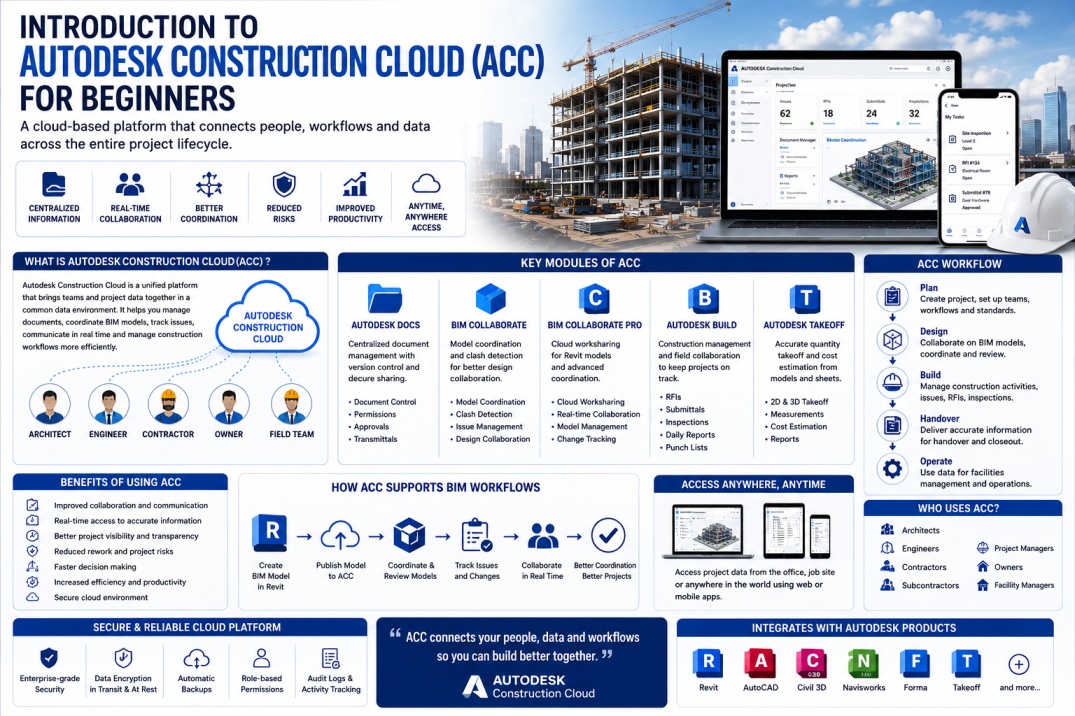
The Architecture, Engineering, and Construction (AEC) industry is rapidly adopting digital technologies to improve collaboration, reduce project risks, and increase efficiency. As construction projects become more complex, teams need reliable ways to share information, coordinate models, manage documents, and communicate across different locations.
Traditional project workflows often rely on emails, local servers, spreadsheets, and multiple disconnected software platforms. These methods can lead to version control issues, communication gaps, and project delays.
To address these challenges, Autodesk developed Autodesk Construction Cloud (ACC), a powerful cloud-based platform designed to connect project teams and project data within a single digital environment.
Today, ACC is widely used by BIM professionals, architects, engineers, contractors, and project managers around the world to improve collaboration and project delivery.
What is Autodesk Construction Cloud?
Autodesk Construction Cloud (ACC) is a cloud-based construction management and BIM collaboration platform developed by Autodesk. It allows project teams to store, manage, review, coordinate, and share project information from a centralized location.
Rather than relying on multiple software systems, ACC brings project data together into a single connected environment where stakeholders can access the latest information anytime and from anywhere.
The platform supports every phase of a project, from planning and design to construction and facility handover.
Why Autodesk Construction Cloud Was Created
Construction projects involve many participants, including architects, structural engineers, MEP consultants, contractors, subcontractors, project managers, and owners.
When each team uses separate systems and communication methods, project information becomes fragmented. This often results in:
- Document version confusion.
- Coordination issues.
- Design conflicts.
- Construction delays.
- Increased project costs.
- Poor communication.
ACC was created to provide a Common Data Environment (CDE) where all project information can be managed in a controlled and collaborative way.
How Autodesk Construction Cloud Works
Autodesk Construction Cloud stores project information securely in the cloud. Authorized team members can access documents, BIM models, drawings, reports, and project data using web browsers, desktop applications, or mobile devices.
Instead of exchanging files through email, project teams work from a shared environment where updates are immediately available to everyone with appropriate permissions.
This approach helps improve communication and reduces the risk of teams working with outdated information.
Key Components of Autodesk Construction Cloud
ACC consists of several integrated modules that support different aspects of project delivery.
Autodesk Docs
Autodesk Docs serves as the foundation of ACC and functions as a centralized document management platform.
Features include:
- Document storage.
- Version control.
- File sharing.
- Permission management.
- Approval workflows.
Autodesk Docs ensures that project teams always have access to the latest information.
BIM Collaborate
BIM Collaborate focuses on design collaboration and model coordination.
It enables project teams to:
- Share BIM models.
- Track design changes.
- Review project issues.
- Coordinate disciplines.
- Perform model reviews.
This helps reduce conflicts and improve design quality before construction begins.
BIM Collaborate Pro
BIM Collaborate Pro extends collaboration capabilities by supporting cloud worksharing for Revit projects.
Multiple team members can work on the same Revit model while the central file is stored securely in the cloud.
This feature is particularly valuable for remote and distributed project teams.
Autodesk Build
Autodesk Build supports construction management activities and field operations.
Users can manage:
- RFIs.
- Submittals.
- Site inspections.
- Punch lists.
- Quality management.
- Daily reports.
Field teams can access project information directly from tablets and smartphones, improving communication between office and site personnel.
Autodesk Takeoff
Autodesk Takeoff helps project teams generate quantities and cost estimates directly from drawings and BIM models.
This improves estimation accuracy and reduces manual effort during project planning.
Benefits of Autodesk Construction Cloud
One of the reasons ACC has become so popular is its ability to improve project collaboration and information management.
Major benefits include:
- Centralized project information.
- Improved BIM collaboration.
- Real-time document access.
- Enhanced project transparency.
- Better issue tracking.
- Reduced communication errors.
- Improved coordination.
- Support for remote work.
- Better document control.
- Increased project efficiency.
These benefits contribute directly to improved project delivery and reduced project risk.
ACC and BIM Workflows
Autodesk Construction Cloud plays a major role in modern BIM workflows.
BIM teams use ACC to coordinate architectural, structural, and MEP models while tracking project issues and design changes.
Instead of exchanging large model files manually, project teams collaborate through the cloud environment.
This approach improves model coordination and supports more efficient BIM project delivery.
Cloud Worksharing in Revit
One of the most valuable features for BIM professionals is Revit Cloud Worksharing.
Traditionally, Revit projects relied on local servers to host central models. This often required significant IT infrastructure and limited access for remote users.
With BIM Collaborate Pro, central models can be stored in the cloud, allowing team members to access and synchronize their work from different locations.
Benefits include:
- Remote project access.
- Improved collaboration.
- Reduced server dependency.
- Faster model sharing.
- Better disaster recovery.
Issue Tracking and Coordination
Large BIM projects often generate numerous design and coordination issues.
ACC allows project teams to create, assign, track, and resolve issues within a centralized environment.
Instead of relying on emails and spreadsheets, issues can be linked directly to BIM models and project documentation.
This improves accountability and helps ensure problems are resolved efficiently.
Who Uses Autodesk Construction Cloud?
ACC is used by a wide range of professionals across the AEC industry.
- Architects.
- Structural Engineers.
- MEP Engineers.
- BIM Modelers.
- BIM Coordinators.
- BIM Managers.
- Contractors.
- Project Managers.
- Facility Managers.
- Building Owners.
Its flexibility makes it suitable for projects of various sizes and complexity levels.
ACC vs Traditional Project Management Methods
Traditional project management often relies on disconnected tools and manual communication methods.
Common challenges include:
- Lost files.
- Duplicate documents.
- Outdated drawings.
- Communication delays.
- Version control problems.
ACC addresses these issues by providing a centralized platform where project information remains organized and accessible.
Why Beginners Should Learn ACC
As cloud-based BIM workflows continue growing, employers increasingly expect BIM professionals to understand Autodesk Construction Cloud.
Learning ACC can help professionals:
- Improve BIM collaboration skills.
- Understand modern project delivery workflows.
- Increase employability.
- Prepare for BIM coordination roles.
- Support remote project environments.
Many organizations now include ACC experience as a desirable skill when hiring BIM professionals.
Future of Autodesk Construction Cloud
Autodesk continues investing in cloud collaboration, Artificial Intelligence, automation, and digital construction technologies.
Future developments may include:
- AI-powered project insights.
- Automated issue management.
- Advanced project analytics.
- Digital Twin integration.
- Improved construction automation.
As construction technology evolves, ACC will continue playing an important role in digital project delivery.
Conclusion
Autodesk Construction Cloud is transforming how BIM teams collaborate, manage information, and deliver projects. By providing a centralized cloud environment for document management, BIM coordination, issue tracking, and construction workflows, ACC helps improve efficiency and reduce project risks.
For beginners entering the BIM industry, learning Autodesk Construction Cloud is becoming increasingly valuable. Understanding ACC not only improves technical skills but also prepares professionals for modern digital construction workflows.
As BIM adoption and cloud collaboration continue growing across the AEC industry, Autodesk Construction Cloud will remain one of the most important platforms shaping the future of project delivery.