Autodesk Construction Cloud (ACC) Complete Guide for BIM Teams
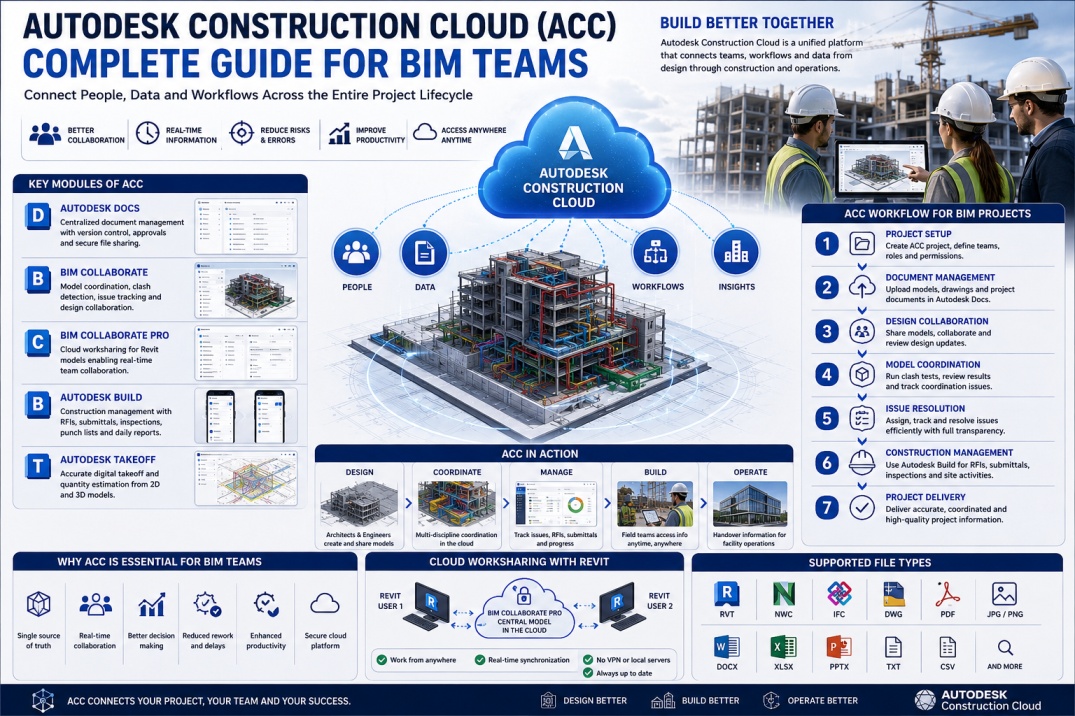
The construction industry is rapidly moving toward digital collaboration and cloud-based project delivery. Traditional methods of sharing drawings, models, emails, and spreadsheets often create communication gaps, version control issues, and project delays. As projects become larger and more complex, BIM teams require a centralized platform where information can be managed efficiently and accessed by all stakeholders.
Autodesk Construction Cloud (ACC) was developed to solve these challenges. It provides a unified cloud environment where architects, engineers, contractors, BIM coordinators, project managers, and owners can collaborate throughout the entire project lifecycle.
Today, ACC is used on thousands of projects worldwide and has become a key component of modern BIM workflows.
What is Autodesk Construction Cloud?
Autodesk Construction Cloud (ACC) is a cloud-based construction management and BIM collaboration platform developed by Autodesk. It connects project teams, project data, workflows, and construction activities within a single digital environment.
ACC allows users to store, review, share, coordinate, and manage BIM models, drawings, documents, RFIs, issues, submittals, and project information from anywhere with internet access.
Instead of relying on disconnected systems, project teams can work from a centralized source of truth throughout the project lifecycle.
Why Autodesk Construction Cloud is Important
Modern construction projects involve multiple stakeholders working across different locations and disciplines. Without proper coordination, project information can become fragmented and difficult to manage.
ACC helps eliminate these challenges by providing a common data environment where project teams can access the latest information at any time.
Benefits include:
- Improved project collaboration.
- Real-time model coordination.
- Better document control.
- Reduced communication errors.
- Improved issue tracking.
- Enhanced BIM workflows.
- Support for remote teams.
- Increased project transparency.
Key Components of Autodesk Construction Cloud
ACC consists of several integrated modules designed to support different stages of project delivery.
Autodesk Docs
Autodesk Docs serves as the foundation of ACC. It acts as a centralized document management system where project files, drawings, BIM models, specifications, and reports are stored.
Features include:
- Version control.
- Document approvals.
- File sharing.
- Permission management.
- Cloud storage.
By maintaining a single source of project information, Autodesk Docs helps reduce confusion and improve project communication.
Autodesk BIM Collaborate
BIM Collaborate focuses on design collaboration and coordination. It enables project teams to review models, track changes, manage issues, and improve coordination workflows.
Key capabilities include:
- Design collaboration.
- Issue management.
- Model review.
- Coordination workflows.
- Automated clash detection.
This module helps project teams identify and resolve design conflicts before construction begins.
BIM Collaborate Pro
BIM Collaborate Pro extends collaboration capabilities by enabling cloud worksharing for Revit projects.
Instead of storing Revit Central Models on local servers, teams can work directly within the cloud environment.
Benefits include:
- Remote collaboration.
- Cloud-hosted Revit models.
- Real-time synchronization.
- Improved accessibility.
- Reduced IT infrastructure requirements.
This feature became particularly valuable as remote and hybrid work environments expanded across the industry.
Autodesk Build
Autodesk Build focuses on construction execution and field management.
It helps project teams manage:
- RFIs.
- Submittals.
- Quality inspections.
- Punch lists.
- Site documentation.
- Daily reports.
Field teams can access project information directly from mobile devices, improving communication between office and site personnel.
Autodesk Takeoff
Autodesk Takeoff supports quantity estimation and cost planning workflows.
Users can perform digital takeoffs directly from project drawings and BIM models.
This improves estimation accuracy while reducing manual effort.
How ACC Supports BIM Teams
One of the biggest advantages of ACC is its ability to support multidisciplinary BIM collaboration.
Architectural, structural, mechanical, electrical, and plumbing teams can work together within the same cloud environment.
Project stakeholders can:
- Review models online.
- Track project issues.
- Coordinate design changes.
- Manage approvals.
- Access project documentation.
- Monitor project progress.
This improves project visibility and reduces coordination delays.
ACC Workflow for BIM Projects
Step 1: Project Setup
Project administrators create the ACC project environment and define team permissions.
Step 2: Document Management
Project files, BIM models, and documentation are uploaded into Autodesk Docs.
Step 3: Design Collaboration
Design teams share models and updates through BIM Collaborate.
Step 4: Model Coordination
Clash detection and coordination reviews are performed within the cloud environment.
Step 5: Issue Resolution
Issues are assigned, tracked, and resolved through coordination workflows.
Step 6: Construction Management
Field teams use Autodesk Build to manage construction activities and project documentation.
Step 7: Project Delivery
Final project information remains stored within ACC for future reference and facility management purposes.
Cloud Worksharing in Revit
One of ACC's most valuable features for BIM professionals is Revit Cloud Worksharing.
Traditional Revit Worksharing relies on local servers and network infrastructure. Cloud Worksharing allows project teams to access central models directly through Autodesk's cloud environment.
Advantages include:
- Remote model access.
- Improved collaboration.
- Reduced server maintenance.
- Enhanced project accessibility.
- Better disaster recovery capabilities.
This capability has transformed how distributed BIM teams collaborate.
ACC vs Traditional File Sharing
Traditional project delivery often relies on emails, shared folders, and local servers.
These methods frequently create problems such as:
- Version confusion.
- Duplicate files.
- Communication gaps.
- Lost project information.
- Limited remote access.
ACC solves these challenges by maintaining centralized project data and structured workflows.
Benefits of Using Autodesk Construction Cloud
- Centralized project information.
- Improved BIM collaboration.
- Faster issue resolution.
- Enhanced project visibility.
- Cloud-based accessibility.
- Reduced project risks.
- Better document management.
- Improved construction coordination.
- Support for remote teams.
- Scalable project workflows.
Challenges of ACC Implementation
Although ACC offers many benefits, organizations may face challenges during implementation.
Common challenges include:
- User training requirements.
- Workflow adaptation.
- Initial setup effort.
- Internet dependency.
- Change management.
Successful implementation requires clear standards, training programs, and management support.
The Future of Autodesk Construction Cloud
Autodesk continues investing heavily in cloud technologies, Artificial Intelligence, automation, and digital construction solutions.
Future developments are expected to include:
- AI-powered project insights.
- Advanced analytics.
- Improved Digital Twin integration.
- Enhanced automation workflows.
- Expanded cloud collaboration capabilities.
As digital transformation accelerates across the AEC industry, cloud-based platforms like ACC will play an increasingly important role in project delivery.
Conclusion
Autodesk Construction Cloud has become one of the most powerful platforms for BIM collaboration and construction management. By connecting project teams, information, and workflows within a centralized cloud environment, ACC helps improve coordination, reduce project risks, and enhance overall project performance.
Whether you are a BIM Modeler, BIM Coordinator, BIM Manager, Architect, Engineer, or Construction Professional, understanding ACC is becoming an essential skill in the modern construction industry.
As BIM technology continues evolving, Autodesk Construction Cloud will remain a key platform supporting digital project delivery, cloud collaboration, and the future of connected construction.