Clash Detection Workflow in BIM Projects: A Complete Guide for BIM Coordination Success
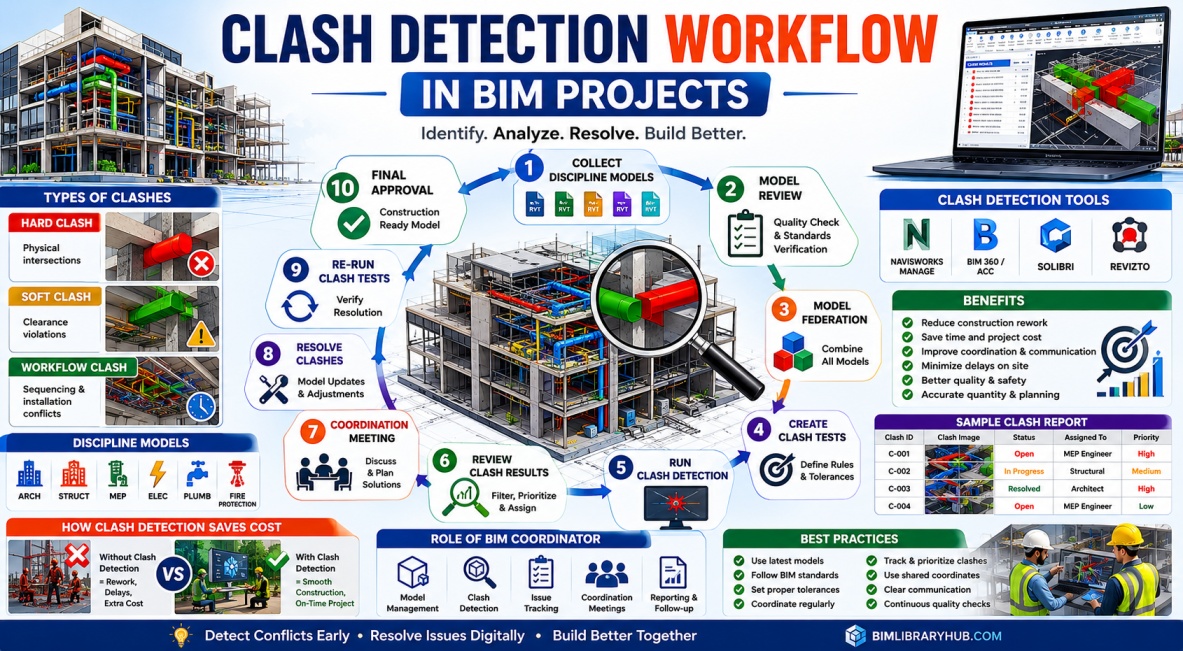
Building Information Modeling (BIM) has transformed the construction industry by enabling architects, engineers, contractors, and project stakeholders to collaborate within a shared digital environment. One of the biggest advantages of BIM is the ability to detect and resolve conflicts before construction starts. This process is known as Clash Detection.
Construction projects involve multiple disciplines working together, including architectural, structural, mechanical, electrical, plumbing, and fire protection teams. Without proper coordination, conflicts between these systems can lead to costly delays, rework, material waste, and construction issues. Clash Detection helps eliminate these problems during the design stage rather than after construction begins.
Today, Clash Detection has become an essential part of BIM coordination workflows and is widely used on residential, commercial, industrial, healthcare, and infrastructure projects worldwide.
What is Clash Detection in BIM?
Clash Detection is the process of identifying conflicts between different building elements within a BIM model. These conflicts occur when two or more components occupy the same physical space or violate required clearance zones.
Using BIM software such as Autodesk Navisworks, Solibri, and Autodesk Construction Cloud, project teams can automatically analyze coordinated models and identify potential issues before they reach the construction site.
Instead of discovering problems during installation, teams can resolve them digitally, saving significant time and money.
Why Clash Detection is Important
Construction errors are expensive. A single unresolved clash can lead to project delays, additional labor costs, redesign efforts, and material wastage.
By performing Clash Detection during the design phase, project teams gain visibility into potential issues and can make informed decisions before construction begins.
Benefits of Clash Detection include:
- Reduced construction rework.
- Improved project coordination.
- Faster project delivery.
- Better communication between disciplines.
- Reduced project costs.
- Improved construction quality.
- Enhanced BIM collaboration.
- Minimized site conflicts.
For large BIM projects, Clash Detection often provides one of the highest returns on investment among all BIM processes.
Types of Clashes in BIM Projects
Not all clashes are the same. BIM professionals generally classify clashes into three primary categories.
Hard Clashes
Hard Clashes occur when two physical elements occupy the same space. These are the most obvious and critical clashes.
Examples include:
- HVAC duct passing through a structural beam.
- Pipe intersecting a concrete column.
- Cable tray colliding with mechanical equipment.
- Structural member crossing architectural walls.
Hard clashes typically require immediate resolution before construction.
Soft Clashes
Soft Clashes involve clearance violations rather than direct physical collisions.
Examples include:
- Insufficient maintenance space around equipment.
- Restricted access to valves and controls.
- Safety clearance violations.
- Service access conflicts.
These clashes may not prevent installation but can create operational and maintenance problems later.
Workflow Clashes
Workflow Clashes are related to construction sequencing and project scheduling.
Examples include:
- Installation order conflicts.
- Trade access restrictions.
- Equipment delivery challenges.
- Temporary construction interference.
These issues affect project execution rather than physical geometry.
Models Involved in Clash Detection
Successful Clash Detection requires the integration of multiple discipline models into a single coordination environment.
Common models include:
- Architectural Model
- Structural Model
- Mechanical Model
- Electrical Model
- Plumbing Model
- Fire Protection Model
- Civil Model
- Infrastructure Model
Combining these models enables project teams to identify and resolve interdisciplinary conflicts.
The Complete Clash Detection Workflow
Step 1: Collect Discipline Models
The first step is gathering the latest BIM models from all project disciplines. Ensuring model versions are current is critical because outdated information can lead to inaccurate clash results.
Step 2: Verify Model Quality
Before coordination begins, BIM teams should review model quality, naming conventions, coordinates, levels, and BIM standards compliance.
Poor model quality often generates false clashes and unnecessary coordination efforts.
Step 3: Model Federation
The collected discipline models are combined into a single federated model using coordination software such as Navisworks Manage.
This creates a unified project environment where all disciplines can be reviewed together.
Step 4: Configure Clash Tests
Clash tests are established based on project requirements.
Typical tests include:
- Mechanical vs Structural
- Mechanical vs Architectural
- Electrical vs Structural
- Plumbing vs Structural
- Fire Protection vs Mechanical
Tolerance settings are also configured to avoid reporting insignificant clashes.
Step 5: Run Clash Detection Analysis
Once tests are configured, the software automatically analyzes model geometry and identifies conflicts.
Large projects may generate thousands of clash results during initial coordination reviews.
Step 6: Review and Categorize Clashes
Not every clash requires action. BIM Coordinators review results and categorize them based on severity and project impact.
Clashes are often classified as:
- Critical
- Moderate
- Minor
- Approved
- False Positive
This prioritization helps teams focus on the most important issues first.
Step 7: Conduct Coordination Meetings
Regular coordination meetings are held to review clash reports and assign responsibilities.
Architects, engineers, BIM coordinators, and project stakeholders collaborate to determine the best solutions for each issue.
Step 8: Resolve Identified Clashes
Project teams update their models based on coordination decisions.
Common solutions include:
- Rerouting ducts and pipes.
- Adjusting equipment locations.
- Modifying structural elements.
- Repositioning cable trays.
- Revising architectural layouts.
The goal is to eliminate conflicts while maintaining project functionality.
Step 9: Re-run Clash Tests
After updates are completed, clash detection is performed again to verify that issues have been resolved.
This iterative process continues until acceptable coordination levels are achieved.
Step 10: Final Coordination Approval
Once major clashes have been resolved, the coordinated model is approved for construction documentation and project execution.
This significantly reduces the likelihood of costly field conflicts.
Software Used for Clash Detection
Autodesk Navisworks Manage
Navisworks Manage remains the most widely used Clash Detection platform in the BIM industry. It supports model federation, clash testing, issue tracking, and coordination workflows.
Autodesk Construction Cloud (ACC)
ACC supports cloud-based issue management and coordination processes, making collaboration easier across distributed teams.
Solibri
Solibri provides advanced rule-based model checking and quality assurance capabilities.
Revizto
Revizto combines BIM coordination with issue management and collaboration tools.
Role of the BIM Coordinator
The BIM Coordinator plays a central role in Clash Detection workflows.
Responsibilities include:
- Managing federated models.
- Running clash tests.
- Preparing clash reports.
- Conducting coordination meetings.
- Tracking issue resolution.
- Ensuring BIM standards compliance.
Effective BIM Coordinators help maintain project alignment and improve collaboration between disciplines.
Best Practices for Clash Detection
- Use shared coordinates across all models.
- Establish BIM standards before modeling begins.
- Coordinate regularly throughout design development.
- Prioritize critical clashes first.
- Maintain issue tracking logs.
- Assign clear ownership for clash resolution.
- Perform quality checks before running clash tests.
- Use cloud collaboration tools when possible.
Following these practices improves project efficiency and reduces coordination challenges.
The Future of Clash Detection
The future of Clash Detection is becoming increasingly intelligent. Artificial Intelligence and machine learning technologies are beginning to automate clash classification, prioritization, and resolution recommendations.
Digital Twins, cloud-based BIM platforms, and real-time coordination tools will further improve project collaboration and decision-making.
As BIM technology continues evolving, Clash Detection will remain one of the most valuable processes for reducing construction risk and improving project outcomes.
Conclusion
Clash Detection is a critical component of successful BIM implementation. By identifying and resolving conflicts before construction begins, project teams can reduce rework, improve coordination, save costs, and deliver higher-quality projects.
From model federation and clash testing to issue tracking and coordination meetings, the Clash Detection workflow provides a structured approach to managing multidisciplinary BIM projects. Organizations that implement effective Clash Detection processes gain significant advantages in project efficiency, collaboration, and overall construction success.
As BIM adoption continues to grow worldwide, Clash Detection will remain an essential skill for BIM Modelers, BIM Coordinators, BIM Managers, and construction professionals across the AEC industry.