Revit Worksharing Explained: How Multiple Users Collaborate on the Same Model
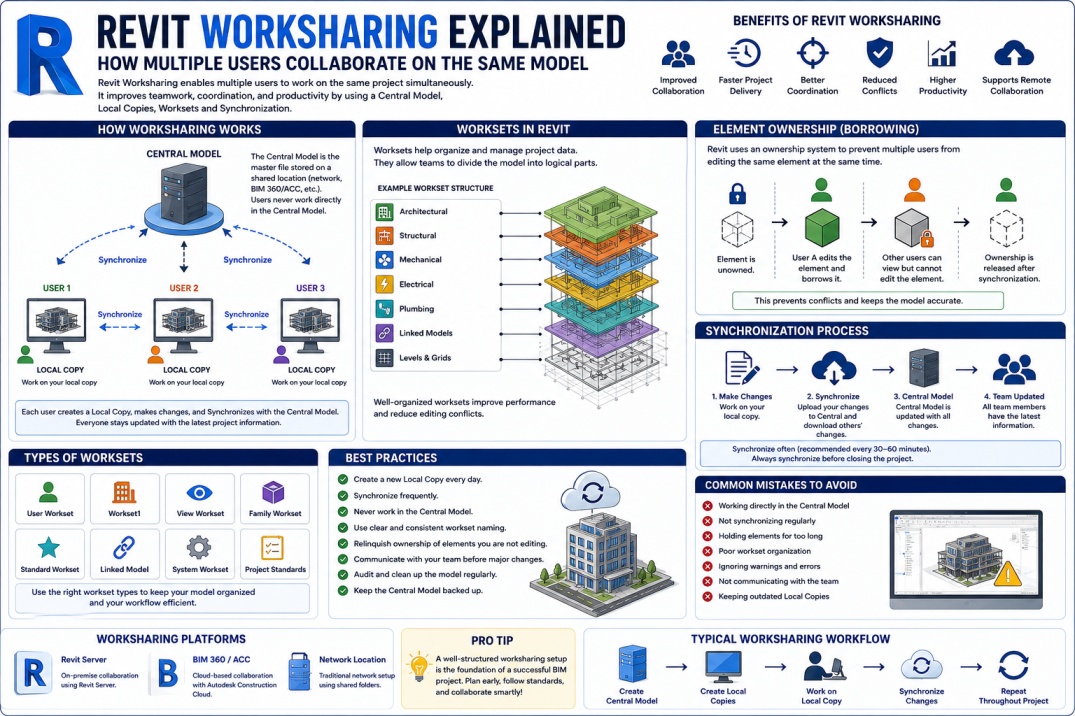
Modern BIM projects involve architects, structural engineers, MEP designers, BIM coordinators, and project managers working together on the same building model. As project complexity increases, collaboration becomes essential for maintaining accuracy, efficiency, and coordination. Autodesk Revit addresses this need through a feature known as Worksharing.
Revit Worksharing enables multiple users to work on the same project simultaneously without constantly overwriting each other's changes. By creating a structured collaboration environment, Worksharing helps teams improve productivity while maintaining project consistency.
Understanding how Worksharing functions is essential for anyone involved in BIM projects, from beginners learning Revit to experienced BIM managers overseeing large multidisciplinary teams.
What is Revit Worksharing?
Revit Worksharing is a collaboration system that allows multiple users to work within a single Revit project. Instead of one user controlling the entire project file, Worksharing creates a shared environment where team members can make changes simultaneously.
The system works by establishing a Central Model that serves as the primary project database. Each team member creates a Local Copy of the model on their computer and works independently. Changes are synchronized with the Central Model, allowing everyone to stay updated with the latest project information.
This approach enables efficient teamwork while reducing the risk of file conflicts and data loss.
Why Worksharing is Important
Large BIM projects often involve hundreds or even thousands of model elements. Without Worksharing, only one person could edit the project at a time, creating significant delays and inefficiencies.
Worksharing allows architects, engineers, and BIM specialists to work simultaneously on different parts of the project. This improves project delivery speed and enhances coordination between disciplines.
By supporting real-time collaboration, Worksharing helps project teams meet deadlines while maintaining model quality and consistency.
Understanding the Central Model
The Central Model is the foundation of Revit Worksharing. It acts as the master project file that stores all project information and records changes made by team members.
The Central Model is typically stored on a shared network location, BIM 360, Autodesk Construction Cloud, or another collaboration platform accessible to authorized users.
Users should never work directly in the Central Model. Instead, they create Local Copies that communicate with the central file during synchronization.
Protecting the Central Model is critical because it contains the most current version of the project.
What is a Local Copy?
A Local Copy is a personal working version of the Central Model created on an individual user's computer. Each team member receives their own Local Copy when opening the shared project.
The Local Copy allows users to work independently without affecting other team members' workflows. As modifications are made, they remain stored locally until synchronized with the Central Model.
This process improves performance and reduces the risk of multiple users editing the same element simultaneously.
How Synchronization Works
Synchronization is the process of transferring changes between Local Copies and the Central Model. When users synchronize their work, Revit updates the Central Model with their changes and downloads updates made by other team members.
Regular synchronization ensures that everyone is working with the latest project information. Most BIM managers recommend synchronizing frequently throughout the day to minimize conflicts and improve coordination.
Synchronization also helps reduce the risk of losing work due to software crashes or hardware issues.
Understanding Worksets
Worksets are one of the most important components of Revit Worksharing. A Workset is a collection of project elements grouped together for management and collaboration purposes.
Worksets help organize project content and control user access to different parts of the model. Teams often create separate Worksets for architectural elements, structural components, MEP systems, linked models, and project views.
By dividing the project into Worksets, teams can improve performance and reduce editing conflicts.
Types of Worksets
There are several common Workset categories used in BIM projects.
- Architectural Worksets
- Structural Worksets
- Mechanical Worksets
- Electrical Worksets
- Plumbing Worksets
- Linked Model Worksets
- Shared Levels and Grids
- Project View Worksets
Proper Workset organization improves project management and supports efficient collaboration.
Element Borrowing and Ownership
To prevent multiple users from editing the same element simultaneously, Revit uses an ownership system.
When a user edits an element, Revit temporarily assigns ownership of that element to the user. Other team members can view the element but cannot modify it until ownership is released.
This process, known as Element Borrowing, helps prevent conflicts and maintains model integrity.
Once changes are synchronized, ownership can be relinquished, allowing others to edit the element if necessary.
Benefits of Revit Worksharing
Revit Worksharing offers numerous advantages for BIM teams and project stakeholders.
- Improved team collaboration
- Faster project delivery
- Better coordination between disciplines
- Reduced file conflicts
- Enhanced model organization
- Greater productivity
- Efficient management of large projects
- Support for remote collaboration
These benefits make Worksharing an essential component of modern BIM workflows.
Common Worksharing Challenges
Although Worksharing provides significant advantages, it can also introduce challenges if not managed properly.
One common issue occurs when users fail to synchronize regularly. This can lead to conflicts, outdated information, and coordination problems.
Another challenge involves improper Workset organization. Poorly structured Worksets can reduce performance and create confusion among project team members.
Network connectivity problems and large model sizes can also impact Worksharing performance.
Best Practices for Successful Worksharing
Successful BIM teams follow established Worksharing standards and procedures.
Users should synchronize regularly throughout the day and always synchronize before closing the project. Creating a new Local Copy daily can also help prevent file corruption and improve performance.
Teams should establish clear Workset naming conventions and assign responsibilities for different project areas. Regular model maintenance and auditing can further improve collaboration efficiency.
Communication remains essential. Team members should coordinate major changes and notify others when editing critical project components.
Worksharing with Autodesk Construction Cloud
Many organizations now use Autodesk Construction Cloud (ACC) or BIM Collaborate Pro to support cloud-based Worksharing. This approach allows project teams to collaborate from different locations while maintaining access to a shared project environment.
Cloud Worksharing reduces dependence on local networks and supports remote collaboration for distributed project teams.
As hybrid and remote work continue to grow, cloud-based collaboration solutions are becoming increasingly important in BIM project delivery.
Common Mistakes to Avoid
Several common mistakes can negatively affect Worksharing performance.
- Working directly in the Central Model
- Forgetting to synchronize changes
- Not relinquishing ownership
- Poor Workset organization
- Ignoring project warnings
- Keeping Local Copies for extended periods
- Failing to communicate major changes
Avoiding these mistakes helps maintain project stability and improves team collaboration.
The Future of Revit Collaboration
As BIM technology continues evolving, collaboration tools are becoming more advanced. Cloud-based platforms, digital twins, AI-powered coordination tools, and real-time collaboration environments are transforming how teams work together.
While Worksharing remains a fundamental Revit feature, future workflows will likely integrate deeper cloud connectivity, automation, and intelligent project management capabilities.
Professionals who understand Worksharing principles today will be better prepared to adapt to these emerging technologies.
Conclusion
Revit Worksharing is one of the most important collaboration features within Autodesk Revit. By allowing multiple users to work on the same project simultaneously, it improves productivity, enhances coordination, and supports efficient BIM project delivery.
Understanding Central Models, Local Copies, Worksets, Synchronization, and ownership management is essential for successful implementation. When combined with proper standards and best practices, Worksharing enables teams to collaborate effectively while maintaining model quality and project consistency.
As BIM projects continue to grow in complexity, mastering Revit Worksharing remains a valuable skill for architects, engineers, BIM coordinators, and project managers across the AEC industry.