Top 20 Revit Add-ins Every BIM Professional Should Use
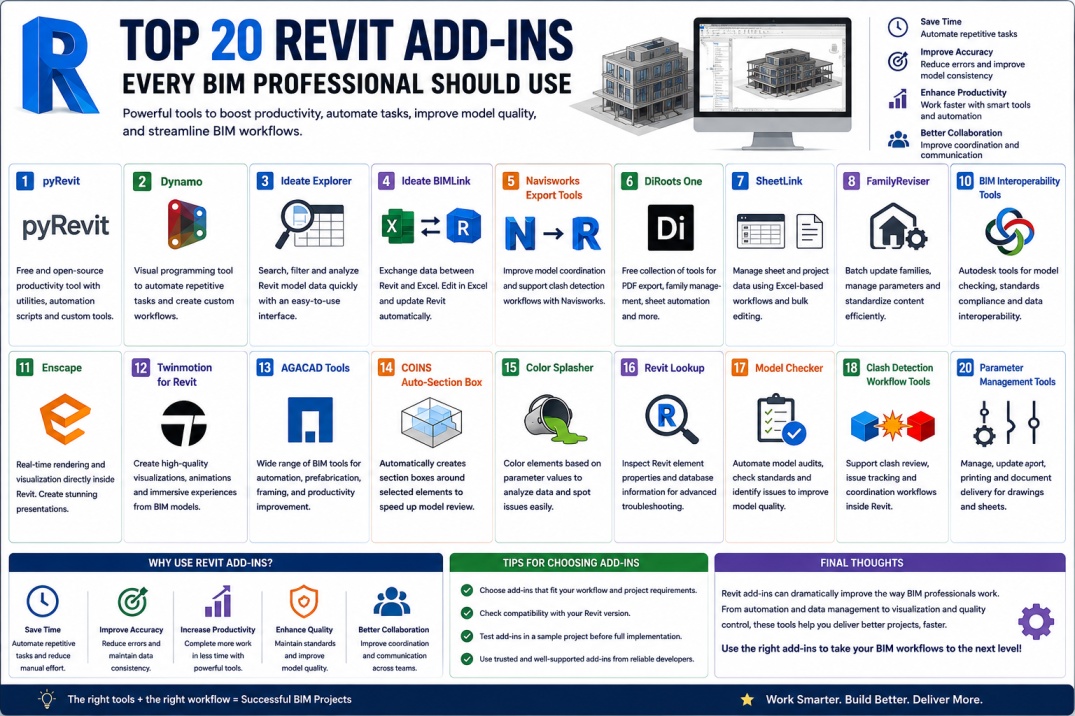
Autodesk Revit has become one of the most widely used BIM platforms in the Architecture, Engineering, and Construction (AEC) industry. While Revit offers extensive tools for modeling, documentation, and coordination, many BIM professionals enhance their workflows using third-party add-ins.
Revit add-ins extend the software's capabilities by introducing automation, quality control tools, data management features, and productivity enhancements. Whether you are an architect, structural engineer, MEP designer, BIM coordinator, or BIM manager, the right add-ins can save hours of manual work and improve project consistency.
As BIM projects become larger and more complex, leveraging specialized add-ins has become an important strategy for improving efficiency and maintaining high-quality models. Here are twenty Revit add-ins that every BIM professional should consider.
1. pyRevit
pyRevit is one of the most popular free Revit add-ins available today. It provides a collection of productivity tools, automation scripts, and customization options that help users streamline daily workflows.
Many BIM managers use pyRevit for project auditing, batch processing, sheet management, and custom tool development.
2. Dynamo
Although included with Revit, Dynamo deserves mention because it is one of the most powerful automation tools available. Dynamo allows users to automate repetitive tasks through visual programming workflows.
From sheet creation to parameter management, Dynamo helps eliminate manual processes and improve BIM productivity.
3. Ideate Explorer
Ideate Explorer helps users search, filter, and analyze Revit project data more efficiently. It provides a spreadsheet-like interface that makes it easier to locate elements and review project information.
This tool is especially useful for BIM coordinators managing large projects.
4. Ideate BIMLink
BIMLink simplifies data exchange between Revit and Excel. Users can export project information, make edits in Excel, and synchronize updates back into Revit.
This significantly improves data management workflows and reduces manual editing effort.
5. Navisworks Export Tools
Coordination workflows often rely on Navisworks. Export tools help improve model exchange between Revit and Navisworks while supporting clash detection and coordination processes.
These tools are essential for multidisciplinary BIM projects.
6. DiRoots One
DiRoots One is a free collection of BIM productivity tools that includes PDF export utilities, family management tools, sheet automation features, and data management capabilities.
Many BIM professionals consider it one of the most valuable free add-ins available.
7. SheetLink
SheetLink allows users to manage sheet and project information through Excel-based workflows. It simplifies bulk editing and helps maintain documentation consistency.
Large projects benefit significantly from this automation capability.
8. FamilyReviser
Managing large family libraries can be challenging. FamilyReviser automates family updates, parameter management, and content standardization across multiple Revit files.
This tool is particularly useful for BIM content managers and library administrators.
9. RTV Tools
RTV Tools provide model auditing, batch processing, family management, and project maintenance capabilities. Many organizations use these tools to maintain BIM standards and improve model health.
They are especially valuable for BIM managers responsible for quality control.
10. BIM Interoperability Tools
Developed by Autodesk, BIM Interoperability Tools help support model checking, standards compliance, and information exchange workflows.
These tools improve consistency and help organizations implement BIM standards effectively.
11. Enscape
Enscape provides real-time rendering and visualization directly from Revit. Designers can create interactive presentations, virtual walkthroughs, and high-quality visualizations quickly.
It is widely used by architects and design teams.
12. Twinmotion for Revit
Twinmotion enables users to create realistic visualizations and immersive experiences from BIM models. It supports rapid rendering and presentation development.
This makes it a valuable tool for design communication and client presentations.
13. AGACAD Tools
AGACAD offers a wide range of BIM tools focused on automation, prefabrication, framing design, and productivity improvement.
These tools are widely used in specialized construction workflows.
14. COINS Auto-Section Box
Navigating complex models can be difficult. Auto-Section Box automatically creates section boxes around selected elements, making model review faster and more efficient.
This simple tool can save significant time during coordination reviews.
15. Color Splasher
Color Splasher visually highlights elements based on parameter values. This helps users analyze project data and identify inconsistencies quickly.
Many BIM coordinators use it during quality control reviews.
16. Revit Lookup
Revit Lookup is a valuable diagnostic tool that allows users to inspect Revit element properties and database information.
It is especially useful for advanced users, developers, and BIM managers.
17. Model Checker
Model Checker helps ensure project compliance with BIM standards and quality requirements. It automates model audits and identifies issues that require attention.
Regular model checking improves consistency and reduces project risks.
18. Clash Detection Workflow Tools
Several add-ins support clash review and coordination workflows by helping teams manage issue tracking and coordination processes directly within Revit.
These tools improve communication and coordination efficiency.
19. Parameter Management Tools
Managing parameters across large projects can be challenging. Specialized parameter management tools help automate updates, standardization, and reporting workflows.
They support better BIM data management and project consistency.
20. Batch Print and Export Tools
Printing and exporting large documentation sets manually can consume significant time. Batch print tools automate PDF generation, sheet exports, and document delivery workflows.
This improves efficiency during project milestones and submissions.
How to Choose the Right Revit Add-ins
Not every project requires every add-in. BIM professionals should evaluate tools based on project size, workflow requirements, team capabilities, and organizational standards.
Some firms prioritize automation and data management, while others focus on visualization, coordination, or quality control. Selecting tools that align with project objectives will deliver the greatest value.
It is also important to verify compatibility with current Revit versions before deployment.
Benefits of Using Revit Add-ins
The right add-ins can provide significant advantages for BIM teams. Benefits often include improved productivity, reduced manual effort, enhanced quality control, better project coordination, and more efficient data management.
Automation tools reduce repetitive tasks, while visualization tools improve communication with stakeholders. Quality control tools help maintain standards and reduce project risks.
Together, these benefits contribute to more successful BIM project delivery.
The Future of Revit Add-ins
As BIM technology continues to evolve, Revit add-ins are becoming increasingly sophisticated. Artificial intelligence, cloud computing, digital twins, and automation technologies are creating new opportunities for workflow enhancement.
Future add-ins will likely offer deeper integration with project data, predictive analytics, and advanced automation capabilities that further improve BIM efficiency.
Professionals who stay informed about emerging tools will be better positioned to take advantage of future innovations.
Conclusion
Revit add-ins have become essential tools for modern BIM professionals. Whether improving productivity, automating repetitive tasks, enhancing visualization, or supporting quality control, these tools help users work smarter and deliver better project outcomes.
The twenty add-ins discussed in this guide represent some of the most useful tools available for Revit users today. By selecting the right combination of add-ins, BIM teams can improve efficiency, strengthen collaboration, and maximize the value of their BIM workflows.
As the AEC industry continues embracing digital transformation, leveraging powerful Revit add-ins will remain a key strategy for achieving project success.