Top 15 Dynamo Scripts Every Revit User Should Know
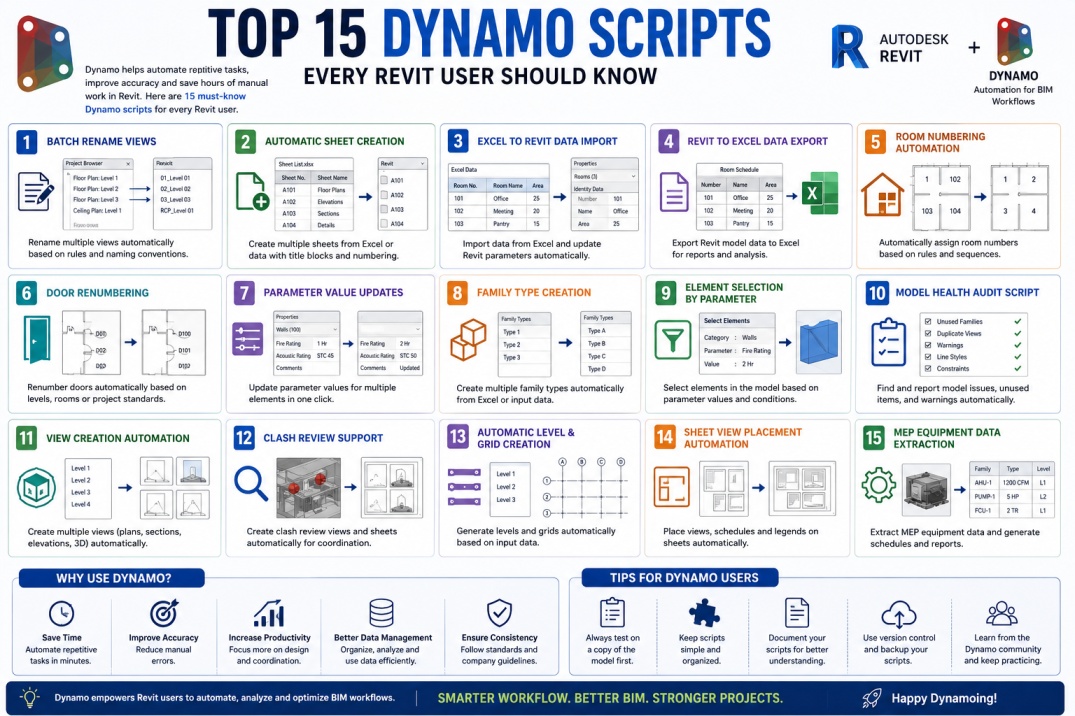
As BIM projects become larger and more data-driven, Revit users often spend significant time performing repetitive tasks such as creating sheets, updating parameters, renaming views, and managing project data. While these tasks are essential, they can consume valuable hours and increase the risk of human error.
Dynamo helps solve this challenge by introducing automation into Revit workflows. As a visual programming tool, Dynamo allows users to automate repetitive processes without requiring advanced coding skills. With the right scripts, tasks that once took hours can be completed in minutes.
Whether you are an architect, structural engineer, MEP designer, BIM coordinator, or BIM manager, learning practical Dynamo scripts can dramatically improve efficiency and project consistency. Here are fifteen Dynamo scripts every Revit user should know.
1. Batch Rename Views
Large projects often contain hundreds of views. Renaming each view manually can be time-consuming and prone to inconsistencies.
A Batch Rename Views script automatically updates view names according to predefined naming conventions. This improves project organization and ensures compliance with BIM standards.
2. Automatic Sheet Creation
Creating multiple sheets manually can become repetitive, especially on large projects. Dynamo can generate sheets automatically using predefined sheet numbers, names, and title blocks.
Many teams connect this workflow with Excel spreadsheets to create hundreds of sheets within minutes.
3. Excel to Revit Data Import
Project information is often maintained in Excel spreadsheets. Dynamo can import data directly into Revit parameters, eliminating manual data entry.
This script is particularly useful for room data, equipment schedules, asset information, and project management workflows.
4. Revit to Excel Data Export
Exporting project information for reporting and analysis is a common BIM requirement.
Dynamo can extract model data and automatically generate Excel reports, helping project teams review schedules, quantities, and project information efficiently.
5. Room Numbering Automation
Assigning room numbers manually can be tedious, especially when project layouts change frequently.
A Room Numbering script automatically assigns room numbers based on project rules, improving consistency and reducing documentation errors.
6. Door Renumbering Script
Door schedules are critical construction documents. Dynamo can automatically renumber doors according to room associations, floor levels, or company standards.
This ensures accurate documentation while significantly reducing manual effort.
7. Parameter Value Updates
Many BIM projects require updating parameter values across hundreds or thousands of elements.
Instead of editing elements individually, Dynamo can update selected parameters automatically, saving considerable time and improving consistency.
8. Family Type Creation
Creating multiple family types manually can be repetitive. Dynamo can generate family types automatically using data from Excel or predefined lists.
This workflow is particularly useful for manufacturers and BIM content creators developing large Revit libraries.
9. Element Selection by Parameter
Finding elements with specific parameter values can be challenging in large models.
Dynamo can automatically select elements based on parameter criteria, helping users quickly locate and manage model components.
10. Model Health Audit Script
Maintaining model quality is essential for BIM success.
Model audit scripts can identify warnings, unused families, duplicate elements, and other issues that negatively affect project performance.
Regular model audits help maintain healthy and efficient Revit projects.
11. View Creation Automation
Projects often require multiple plans, sections, elevations, and 3D views.
Dynamo can generate these views automatically based on project requirements, reducing repetitive setup tasks and ensuring consistency across documentation.
12. Clash Review Support
Coordination teams frequently work with clash reports generated from Navisworks and other BIM tools.
Dynamo can help visualize clash locations, create review views, and support coordination workflows by automatically organizing clash information inside Revit.
13. Automatic Level and Grid Creation
Setting up levels and grids is one of the first tasks performed in many projects.
Dynamo can generate levels and grids automatically using predefined spacing, naming conventions, and project requirements.
This improves consistency while reducing setup time.
14. Sheet View Placement Automation
After sheets are created, views must often be placed and organized manually.
Dynamo can automatically place floor plans, sections, elevations, and schedules onto sheets according to company standards.
This significantly accelerates documentation workflows.
15. MEP Equipment Data Extraction
MEP projects contain large amounts of equipment information that must be managed throughout design and construction.
Dynamo can extract equipment parameters, generate reports, and support asset management workflows. This automation is particularly valuable for BIM coordinators and facility management teams.
Why These Dynamo Scripts Matter
The primary goal of BIM automation is not simply to save time. Automation improves consistency, reduces errors, supports BIM standards, and allows project teams to focus on higher-value activities such as design, coordination, and problem-solving.
Many organizations adopt Dynamo because it creates scalable workflows that can be reused across multiple projects. Once a script is developed and tested, it can continue delivering value for years.
As project complexity increases, automation becomes a competitive advantage that helps firms deliver projects more efficiently.
Best Practices When Using Dynamo Scripts
Before implementing Dynamo scripts, teams should establish clear testing procedures. Scripts should always be validated on sample projects before being used in production environments.
Users should also maintain script documentation, version control, and backup procedures to ensure long-term reliability.
Keeping scripts simple and well-organized makes them easier to maintain and improves adoption across project teams.
The Future of Dynamo Automation
Dynamo continues to evolve alongside BIM technology. Today, many organizations are combining Dynamo with artificial intelligence, cloud computing, digital twins, and advanced data analytics.
As automation becomes more integrated into BIM workflows, Dynamo skills will become increasingly valuable for architects, engineers, BIM managers, and construction professionals.
Learning Dynamo today not only improves productivity but also prepares professionals for the future of digital construction and BIM innovation.
Conclusion
Dynamo has transformed the way Revit users approach repetitive tasks and project workflows. From sheet creation and parameter management to room numbering and model auditing, Dynamo scripts can save countless hours while improving project quality and consistency.
The fifteen scripts discussed in this guide represent some of the most practical and widely used automation workflows available to BIM professionals. By incorporating these tools into daily operations, Revit users can work more efficiently, reduce manual effort, and unlock the full potential of BIM automation.
As the AEC industry continues its digital transformation, mastering Dynamo will remain one of the most valuable skills for anyone working with Autodesk Revit and Building Information Modeling.