What is Dynamo in Revit? A Beginner's Guide to BIM Automation
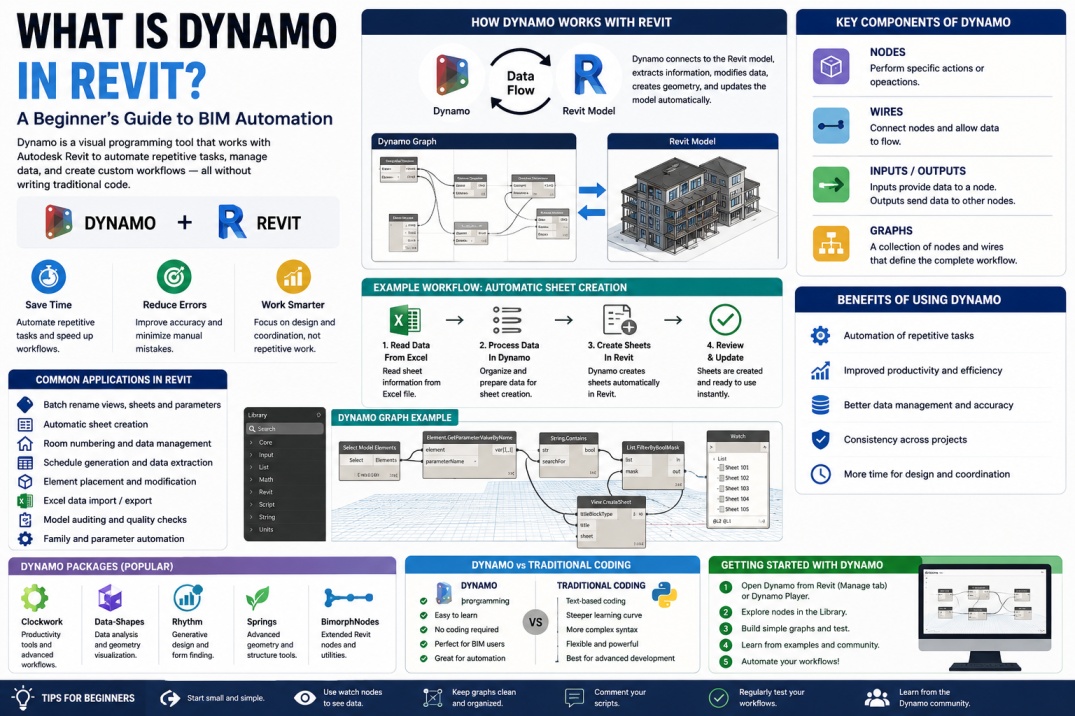
Building Information Modeling (BIM) has transformed the Architecture, Engineering, and Construction (AEC) industry by improving collaboration, data management, and project efficiency. As BIM projects become increasingly complex, professionals often face repetitive tasks that consume valuable time and increase the risk of human error. This is where Dynamo comes into play.
Dynamo is a visual programming platform that works alongside Autodesk Revit, enabling users to automate workflows, manage data, and create custom solutions without requiring advanced programming knowledge. By using Dynamo, BIM professionals can perform tasks that would normally take hours in just a few minutes.
Whether you are an architect, structural engineer, MEP designer, BIM coordinator, or Revit user, understanding Dynamo can significantly improve your productivity and help you unlock new possibilities within your BIM projects.
What is Dynamo?
Dynamo is an open-source visual programming tool developed for use with Autodesk software, particularly Revit. Instead of writing traditional code, users create workflows using nodes and connections that represent different actions and functions.
Each node performs a specific task such as selecting elements, modifying parameters, generating geometry, extracting data, or performing calculations. By connecting nodes together, users create automated workflows known as scripts or graphs.
This visual approach makes programming more accessible to BIM professionals who may not have a software development background while still providing powerful automation capabilities.
Why Was Dynamo Created?
Many Revit users spend a significant amount of time performing repetitive tasks. These tasks may include renaming views, updating parameters, creating sheets, numbering rooms, generating schedules, or placing hundreds of elements throughout a project.
Performing these operations manually can be time-consuming and increases the likelihood of mistakes. Dynamo was developed to help users automate repetitive processes and focus on higher-value design and coordination activities.
By reducing manual effort, Dynamo helps improve project consistency, accuracy, and efficiency across BIM workflows.
How Dynamo Works with Revit
Dynamo integrates directly with Revit and can access model information through Revit's database. This allows users to read, analyze, modify, and create project data automatically.
For example, a Dynamo script can collect all doors in a project, extract their parameters, update specific values, and generate reports without requiring manual input for each individual element.
Because Dynamo works directly with Revit elements, it can automate both geometric and non-geometric tasks, making it an extremely versatile BIM tool.
Key Components of Dynamo
To understand Dynamo, it is important to become familiar with several basic concepts.
Nodes
Nodes are the building blocks of Dynamo scripts. Each node performs a specific operation, such as selecting elements, performing calculations, or modifying data.
Wires
Wires connect nodes together and allow information to flow through the script. They define how data moves between different operations.
Inputs and Outputs
Inputs provide information to a node, while outputs deliver processed information to other nodes within the workflow.
Graphs
A collection of connected nodes forms a graph. This graph represents the complete automation workflow.
Understanding these components helps beginners build and modify Dynamo scripts more effectively.
Benefits of Using Dynamo in Revit
Dynamo offers numerous advantages for BIM professionals and project teams.
Automation of Repetitive Tasks
One of Dynamo's biggest benefits is its ability to automate repetitive operations. Tasks that would normally require hours of manual work can often be completed within minutes.
Improved Productivity
By automating routine workflows, project teams can spend more time focusing on design, coordination, and problem-solving rather than repetitive data management.
Reduced Human Error
Manual processes often introduce inconsistencies and mistakes. Automated workflows help maintain accuracy and improve data quality across projects.
Better Data Management
Dynamo can organize, analyze, and manipulate large amounts of project information more efficiently than manual methods.
Enhanced BIM Workflows
Automation improves consistency across projects and supports company BIM standards.
Common Dynamo Applications in Revit
Dynamo can be applied to a wide variety of BIM workflows.
Some common examples include:
- Batch renaming views and sheets
- Automatic sheet creation
- Room numbering automation
- Parameter management
- Schedule generation
- Model auditing
- Element placement automation
- Excel and Revit data exchange
- Geometry creation and manipulation
- Clash review support
These workflows help improve project efficiency while reducing repetitive manual effort.
Dynamo and Excel Integration
One of Dynamo's most popular capabilities is its integration with Microsoft Excel. Many BIM professionals use spreadsheets to manage project data, equipment schedules, room information, and asset tracking.
Dynamo allows users to export Revit data to Excel and import Excel data back into Revit automatically. This creates a powerful connection between BIM models and external data sources.
For example, project teams can update hundreds of parameter values in Excel and synchronize those changes with Revit using a Dynamo script.
Dynamo Packages and Extensions
The Dynamo community has developed numerous packages that extend Dynamo's capabilities. These packages provide additional nodes and tools for specialized workflows.
Popular Dynamo packages include:
- Clockwork
- Data-Shapes
- Rhythm
- Springs
- BimorphNodes
These packages help users solve complex problems and create more advanced automation workflows.
Dynamo vs Traditional Programming
Many beginners wonder whether they should learn Dynamo or traditional programming languages such as Python or C#.
Dynamo is generally easier to learn because it uses a visual interface instead of text-based code. This makes it ideal for BIM professionals who want automation capabilities without becoming software developers.
However, Dynamo also supports Python scripting, allowing advanced users to extend functionality and create more sophisticated solutions when needed.
For most Revit users, Dynamo provides an excellent starting point for learning BIM automation.
Challenges New Users May Face
Although Dynamo is user-friendly compared to traditional programming, beginners may still encounter challenges.
Common difficulties include understanding data structures, managing lists, troubleshooting errors, and building efficient workflows. Fortunately, the Dynamo community provides extensive learning resources, tutorials, and sample scripts.
Regular practice and experimentation are often the best ways to develop confidence and improve Dynamo skills.
The Future of Dynamo and BIM Automation
As BIM technology continues to evolve, automation will play an increasingly important role in project delivery. Dynamo is already being used to support advanced workflows involving generative design, artificial intelligence, digital twins, and cloud-based BIM platforms.
Organizations are increasingly adopting automation strategies to improve productivity, reduce project risks, and maintain competitive advantages. Dynamo remains one of the most accessible and powerful tools available for achieving these goals.
Professionals who develop Dynamo skills today will be well positioned to take advantage of future BIM innovations.
Conclusion
Dynamo has become one of the most valuable tools available to Revit users and BIM professionals. By providing a visual programming environment, it enables users to automate repetitive tasks, improve data management, and enhance project workflows without requiring extensive coding experience.
Whether you are new to BIM automation or looking to improve your existing workflows, learning Dynamo can significantly increase productivity and expand your capabilities within Autodesk Revit. As the AEC industry continues to embrace digital transformation, Dynamo will remain an essential tool for creating smarter, faster, and more efficient BIM projects.