Revit Family Creation Best Practices: A Complete Guide for BIM Professionals
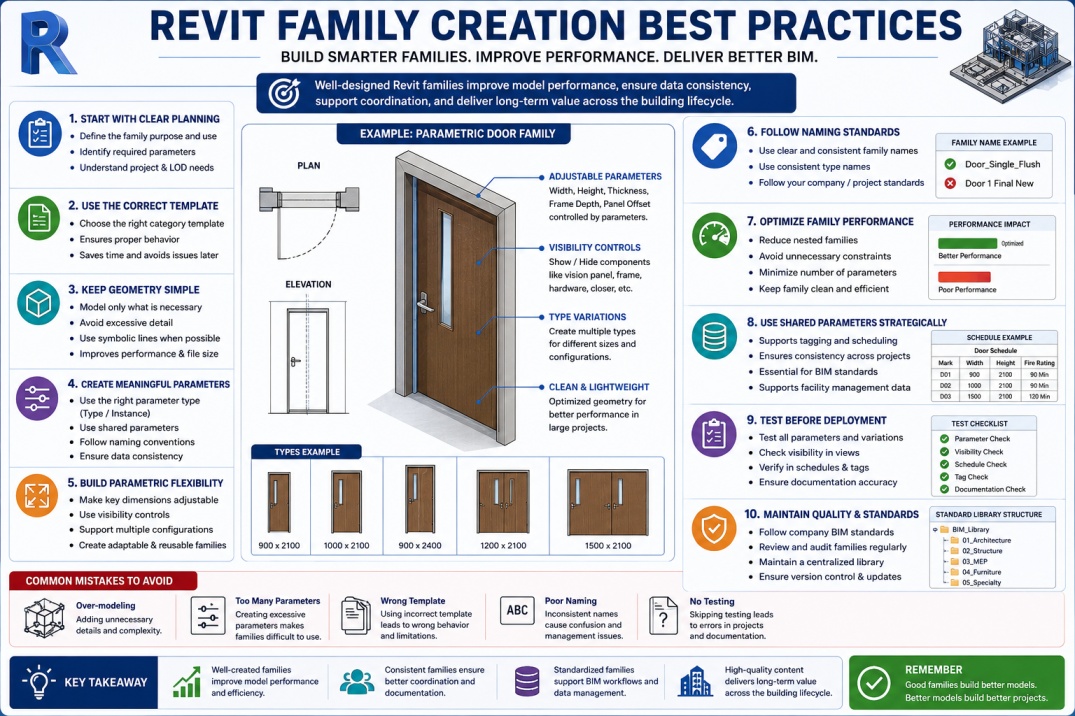
Revit families are one of the most important components of Building Information Modeling (BIM). Every door, window, piece of furniture, lighting fixture, equipment component, and mechanical system within a Revit project is typically represented by a family. These families not only define the geometry of elements but also contain valuable information used for scheduling, documentation, facility management, and project coordination.
As BIM projects become larger and more complex, the quality of Revit families has a direct impact on project performance. Poorly developed families can slow down models, create documentation issues, increase file sizes, and cause coordination challenges. On the other hand, well-structured families improve workflow efficiency, support BIM standards, and contribute to better project outcomes.
Understanding Revit family creation best practices helps BIM professionals develop content that is flexible, reusable, and optimized for real-world projects.
Understanding Revit Families
Before discussing best practices, it is important to understand what Revit families are and why they are essential. A family is a collection of elements that share common properties and behaviors. Families allow users to create intelligent building components that can be reused throughout multiple projects.
Revit contains several family types, including System Families, Loadable Families, and In-Place Families. System Families are built directly into Revit and include elements such as walls, floors, roofs, and ceilings. Loadable Families are externally created components that can be inserted into projects as needed. In-Place Families are custom elements created specifically for unique project conditions.
Among these family types, Loadable Families are the most commonly developed by BIM professionals and manufacturers because they offer the highest level of flexibility and reusability.
Why Family Quality Matters
Many BIM users focus primarily on creating geometry, but family quality extends far beyond appearance. High-quality families contribute to model performance, documentation accuracy, scheduling consistency, and long-term project management.
Poorly optimized families often contain unnecessary geometry, excessive parameters, and inefficient constraints. These issues can significantly increase project file size and negatively affect overall model performance.
Well-developed families improve coordination between disciplines, simplify project maintenance, and support more reliable BIM workflows throughout the building lifecycle.
Start with a Clear Purpose
One of the most important family creation practices is defining the family's purpose before beginning development. Understanding how the family will be used helps determine the appropriate level of detail, required parameters, and expected behavior.
A family designed for conceptual design may require very different information compared to a family intended for construction documentation or facility management. Defining project requirements early helps avoid unnecessary complexity and reduces future modifications.
Before creating a family, BIM professionals should identify what information users need, how the family will be scheduled, and whether it must support tagging or asset management requirements.
Select the Correct Family Template
Choosing the correct family template is a critical step that is often overlooked. Revit provides various templates designed for different categories and behaviors.
Using the appropriate template ensures that the family interacts correctly with project elements, schedules, and documentation workflows. Selecting the wrong template can create limitations that are difficult to correct later.
Templates also contain predefined settings and behaviors that help maintain consistency throughout family development. Starting with the correct template saves time and reduces future complications.
Keep Geometry Simple and Efficient
One of the most common mistakes in family creation is over-modeling. While highly detailed families may appear visually impressive, excessive geometry can negatively impact project performance.
Families should contain only the level of detail necessary for their intended purpose. Unnecessary bolts, screws, decorative features, and complex shapes often increase file sizes without providing meaningful project value.
Simple geometry improves loading times, reduces memory usage, and supports better overall model performance. BIM professionals should focus on creating efficient representations that communicate design intent without introducing unnecessary complexity.
Use Parameters Effectively
Parameters transform static geometry into intelligent BIM content. Proper use of parameters allows families to adapt to different project requirements while reducing the need to create multiple family versions.
When developing families, it is important to determine which dimensions and properties should remain fixed and which should be adjustable. Type Parameters control information shared by all family instances of the same type, while Instance Parameters allow individual elements to contain unique values.
Using parameters strategically increases flexibility and improves long-term family usability. However, excessive parameters should be avoided because they can make families difficult to manage and understand.
Develop Parametric Flexibility
A major advantage of Revit families is their ability to adapt through parametric controls. Families should be designed to accommodate variations in size, configuration, and visibility whenever appropriate.
Parametric flexibility allows a single family to support multiple project conditions. This reduces library size, improves consistency, and minimizes duplication.
For example, a door family may support multiple widths and heights through adjustable parameters rather than requiring separate families for each configuration.
Follow Consistent Naming Standards
Consistency is essential for effective BIM content management. Family names, type names, and parameters should follow established naming standards throughout the organization.
Clear naming conventions help users locate content quickly, reduce confusion, and improve collaboration across project teams. Consistent standards also support automation, scheduling, and quality control processes.
Organizations that maintain standardized naming systems often experience greater efficiency when managing large BIM libraries.
Optimize Family Performance
Performance optimization should be a priority during family development. Large projects may contain thousands of family instances, making efficiency extremely important.
Reducing unnecessary constraints, minimizing nested families, and limiting excessive detail can significantly improve performance. BIM professionals should also avoid using imported CAD files whenever possible, as they often introduce unnecessary complexity.
Regular performance reviews help ensure that families remain lightweight and efficient without sacrificing functionality.
Leverage Shared Parameters
Shared Parameters play an important role in BIM standardization. Unlike Project Parameters, Shared Parameters can be reused across multiple projects and support tagging, scheduling, and information exchange workflows.
Using Shared Parameters helps organizations maintain consistency and improve interoperability between projects. They are particularly valuable for manufacturer information, asset tracking, facility management data, and COBie deliverables.
Developing a centralized Shared Parameter strategy can significantly improve data quality and project coordination.
Test Families Before Deployment
Testing is one of the most critical stages of family development. Families should never be added to production projects without thorough validation.
Testing should include parameter flexibility, visibility controls, scheduling functionality, tagging compatibility, and documentation performance. Family creators should verify that all parameters behave as expected under different project conditions.
Comprehensive testing reduces project risks and helps ensure reliable family performance throughout the project lifecycle.
Common Family Creation Mistakes
Many BIM professionals encounter challenges when developing families. Common mistakes include excessive detail, poor parameter organization, inconsistent naming conventions, and lack of testing.
Another frequent issue is creating separate families for every variation instead of using parametric controls. This increases library size and makes content management more difficult.
Avoiding these mistakes helps create more efficient, scalable, and maintainable BIM content.
Building a Standardized Family Library
Organizations benefit greatly from maintaining a centralized family library. Standardized libraries improve consistency, reduce duplication, and support more efficient project delivery.
Quality control procedures should be established to review and approve new content before it becomes available to project teams. Regular audits can help identify outdated or underperforming families.
A well-maintained BIM library becomes a valuable organizational asset that improves productivity across multiple projects.
The Future of Revit Family Development
As BIM technology continues to evolve, family development is becoming increasingly sophisticated. Digital twins, cloud-based BIM platforms, manufacturer-specific content, and artificial intelligence are beginning to influence how BIM content is created and managed.
Future families will likely contain more structured information, greater interoperability, and stronger connections to facility management systems. BIM professionals who understand family optimization and data management will be well positioned to support these advancements.
Conclusion
High-quality Revit families are fundamental to successful BIM implementation. They improve model performance, enhance coordination, support accurate documentation, and provide valuable project information throughout the building lifecycle.
By following family creation best practices such as selecting appropriate templates, simplifying geometry, using parameters effectively, maintaining naming standards, and performing thorough testing, BIM professionals can create efficient and reusable content that supports long-term project success.
As BIM adoption continues to expand across the AEC industry, investing time in developing high-quality Revit families will remain one of the most effective ways to improve project efficiency, consistency, and overall BIM performance.