Shared Parameters vs Project Parameters in Revit: Understanding the Key Differences
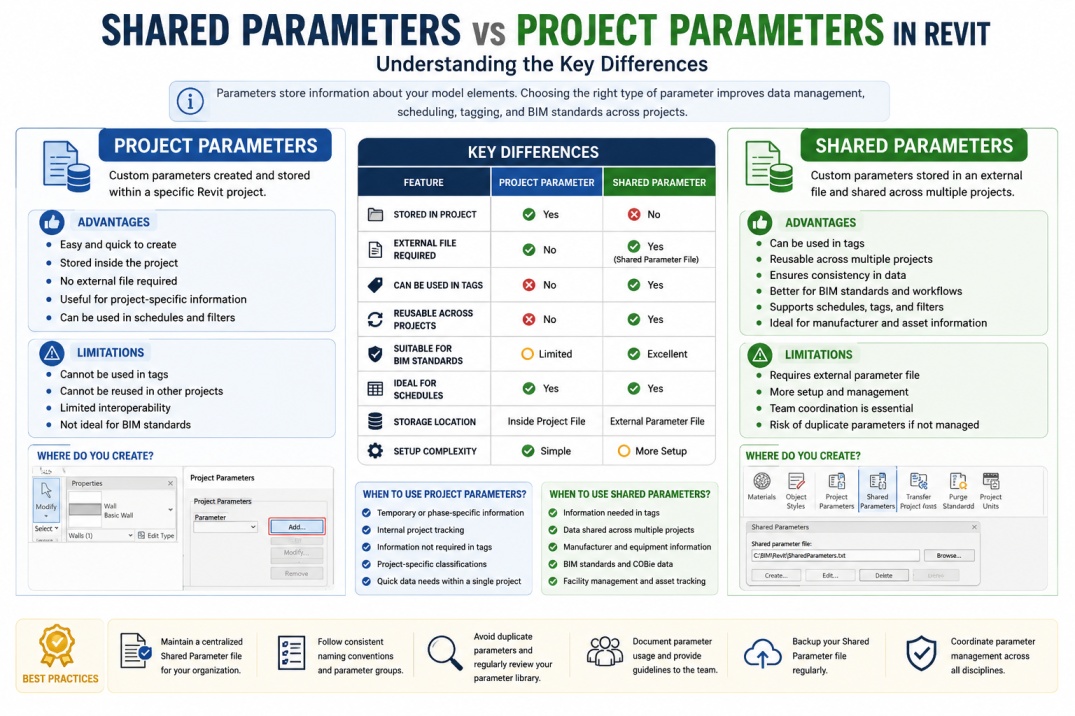
Parameters are one of the most powerful features in Autodesk Revit. They allow users to store, organize, and manage information associated with building elements. Whether you are working on architectural, structural, or MEP projects, parameters help control the data that drives schedules, tags, documentation, and BIM workflows.
As BIM projects become increasingly data-driven, understanding how to use parameters effectively is essential. Among the different parameter types available in Revit, Shared Parameters and Project Parameters are two of the most commonly used. While they may appear similar at first glance, they serve different purposes and offer unique advantages depending on project requirements.
Choosing the correct parameter type can improve project organization, support BIM standards, and enhance collaboration between project teams. Understanding their differences helps BIM professionals make better decisions when managing project information.
What Are Parameters in Revit?
Before comparing Shared Parameters and Project Parameters, it is important to understand what parameters are. In Revit, parameters are pieces of information attached to model elements. They store data that can be used for scheduling, filtering, tagging, calculations, and documentation.
Examples of parameter information include manufacturer names, model numbers, equipment IDs, fire ratings, costs, dimensions, material specifications, and maintenance data. Parameters transform Revit models from simple 3D geometry into intelligent BIM databases.
The ability to manage and control information efficiently is one of the reasons why Revit is such a powerful BIM platform.
What Are Project Parameters?
Project Parameters in Revit are custom parameters created directly within a project file. They allow users to add additional information to categories of elements without modifying the family itself.
When a Project Parameter is created, it exists only within that specific Revit project. The parameter information is stored inside the project file and is not automatically available in other projects.
Project Parameters are commonly used when teams need additional project-specific information that does not require tagging or reuse across multiple projects.
For example, a project team may create a custom parameter to track construction phases, internal review comments, procurement status, or project-specific classifications.
Advantages of Project Parameters
One of the biggest advantages of Project Parameters is their simplicity. They can be created quickly without requiring external files or additional setup procedures.
Because the parameters are stored directly within the project, there is no need to manage external parameter files. This makes them convenient for temporary information and project-specific requirements.
Project Parameters can also be used in schedules, filters, and project data management workflows. For many projects, they provide a simple solution for storing information that does not need to be shared outside the project environment.
Limitations of Project Parameters
Despite their convenience, Project Parameters have several limitations. One of the most significant limitations is that they cannot be used in tags. This means that information stored within Project Parameters cannot be displayed directly on drawings using Revit tagging tools.
Another limitation is that Project Parameters are not easily transferable between projects. If another project requires the same parameter, it must be recreated manually.
These restrictions can create challenges for organizations that need consistent BIM standards across multiple projects.
What Are Shared Parameters?
Shared Parameters in Revit are custom parameters stored in an external parameter file outside the project environment. Unlike Project Parameters, Shared Parameters can be reused across multiple projects and families.
Because they are stored externally, Shared Parameters maintain a consistent identity regardless of where they are used. This makes them particularly valuable for organizations that require standardized data management practices.
Shared Parameters are commonly used for manufacturer information, asset tracking, facility management data, equipment identification, and BIM deliverables that require consistency across multiple projects.
Advantages of Shared Parameters
One of the most important benefits of Shared Parameters is that they can be used in tags. This allows information stored in Shared Parameters to be displayed directly on drawings and construction documents.
Shared Parameters can also be used across multiple projects, making them ideal for organizations that follow BIM standards and company-wide templates.
Because Shared Parameters maintain a unique identifier, they support consistent scheduling, reporting, and information exchange. They are frequently used in COBie workflows, facility management systems, and digital asset management strategies.
Many BIM managers prefer Shared Parameters because they provide greater control over data standardization and interoperability.
Limitations of Shared Parameters
Although Shared Parameters offer significant advantages, they require additional management. Organizations must maintain and control the external Shared Parameter file to ensure consistency.
Improper management can lead to duplicate parameters, naming conflicts, and confusion between project teams. Establishing clear parameter standards is essential when working with Shared Parameters.
The setup process is also slightly more complex compared to Project Parameters, particularly for organizations new to BIM standardization.
Shared Parameters vs Project Parameters
Understanding the differences between these two parameter types is essential for effective BIM data management.
| Feature | Project Parameter | Shared Parameter |
|---|---|---|
| Stored Inside Project | Yes | No |
| External File Required | No | Yes |
| Can Be Used in Tags | No | Yes |
| Reusable Across Projects | No | Yes |
| Supports BIM Standards | Limited | Excellent |
| Suitable for Company Templates | Limited | Yes |
| Works in Schedules | Yes | Yes |
When Should You Use Project Parameters?
Project Parameters are ideal when information is only required for a specific project. They work well for temporary data, internal project tracking, and information that does not need to appear in tags.
Examples include review comments, project-specific classifications, construction phases, and temporary management information. Because they are easy to create and manage, they are often used for quick project requirements.
When Should You Use Shared Parameters?
Shared Parameters are the preferred choice when data must be standardized across multiple projects. They are especially useful for information that needs to appear in tags, schedules, and facility management systems.
Examples include equipment IDs, asset numbers, manufacturer information, maintenance records, door numbers, room identifiers, and COBie-related data.
Organizations implementing BIM standards typically rely heavily on Shared Parameters to maintain consistency and support long-term information management strategies.
Best Practices for BIM Teams
Successful BIM teams establish clear parameter management procedures. Maintaining a centralized Shared Parameter file helps ensure consistency across projects and reduces duplication.
Teams should follow naming standards, document parameter usage, and regularly review parameter libraries to prevent conflicts. BIM managers should also provide guidance on when to use Shared Parameters versus Project Parameters.
Proper planning and governance can significantly improve data quality and reduce project coordination issues.
Common Mistakes to Avoid
One common mistake is using Project Parameters for information that later needs to be tagged. Because Project Parameters cannot be tagged, this often creates unnecessary rework.
Another mistake is creating duplicate Shared Parameters with slightly different names. This can lead to confusion, inconsistent schedules, and reporting problems.
Poor parameter naming conventions and lack of documentation can also create challenges as projects become larger and more complex.
Conclusion
Both Shared Parameters in Revit and Project Parameters in Revit play important roles in BIM workflows. Project Parameters provide a simple solution for project-specific information, while Shared Parameters support standardization, tagging, scheduling, and interoperability across multiple projects.
Understanding when and how to use each parameter type can significantly improve BIM data management and project efficiency. By implementing proper parameter strategies, BIM professionals can create more organized models, improve documentation quality, and support long-term information management objectives.
As BIM adoption continues to expand throughout the AEC industry, mastering Shared Parameters and Project Parameters remains an essential skill for Revit users, BIM Coordinators, and BIM Managers alike.